
Yes. Write subtle or light in the details box for a few thin color shifts, or heavy for a torn, full-frame distortion. Leaving it empty gives a classic middle-strength look.


Drop an AI Glitch Effect onto any photo and it picks up the color splits, scan lines and torn bands of a signal that broke at just the right moment. The subject stays readable underneath, so the result works as a poster, a cover or a profile image rather than pure noise. Because the distortion is generated rather than stamped on, every run breaks a little differently.
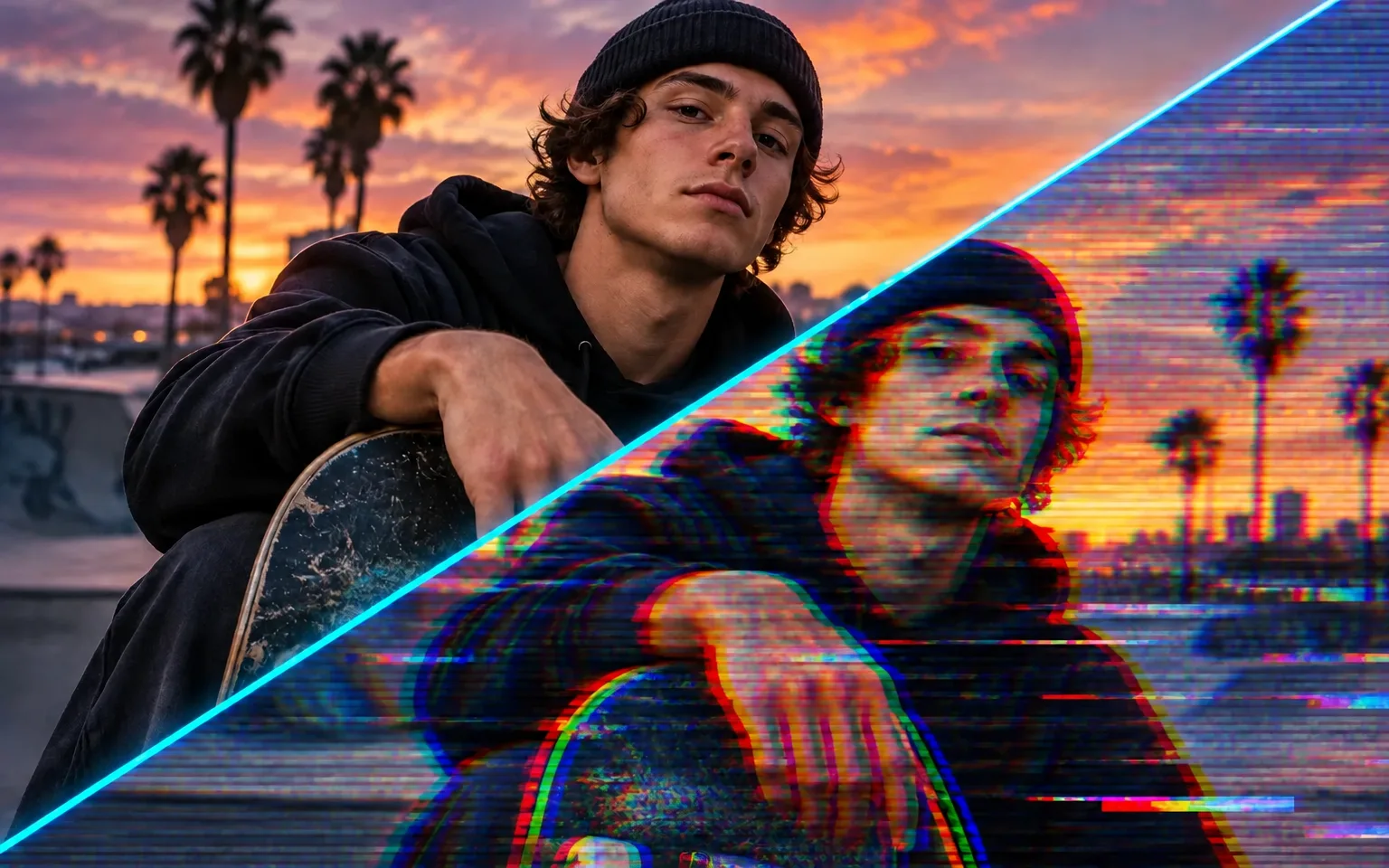
Red, green and blue layers slide apart along faces, outlines and bright highlights, giving the image the feel of a screen that is about to give up. The offset follows contours that already exist in your photo, so the split reads as part of the picture, not a flat texture.
Try it nowHorizontal slices shift sideways, thin scan lines run across the frame and short streaks of sorted pixels drag color out of bright areas. Together they add motion and energy to a still frame, like a paused video when the tape or the signal can no longer keep up.
Try it nowThe AI Glitch Effect is layered over your photo instead of replacing it. Subject, identity and composition are kept recognizable, so a portrait still shows who it is and a product still shows its shape, even when a band cuts through part of the frame.
Try it nowNothing is introduced that was not already in the photo: no fake error messages, no watermark, no border and no new props. If you want a caption, a logo or a frame, add it afterwards in your own layout tool so the lettering stays sharp and under your control.
Try it nowGive selfies and headshots a futuristic, broken-signal look, with neon color fringes tracing hair, jaw and shoulders.
Create striking visuals for singles, mixtapes and club nights, then set the titles in your own design tool.
Ask for a few thin color shifts for a clean poster, or a heavy, torn look when the distortion itself is the message.
Describe an old-monitor, VHS or tape-damage look to steer the texture toward analog video rather than digital data errors.
Push a gadget, sneaker or headphone shot toward a hacked, high-energy mood while its outline stays clear enough to recognize.
Name the colors of the split, such as neon pink and cyan or acid green, to match a brand, a stage lighting plan or an event theme.
Make cover art, lineup posters and stream banners stand out, using one glitch treatment across a whole release.
Post eye-catching glitch portraits and thumbnails that still show your face clearly at small preview sizes.
Create futuristic promo visuals for launches, tournaments and teasers without building the effect by hand.
Add digital energy to campaign imagery and test a distorted variant next to the clean original before committing to it.
 GPT-Image-2.5OpenAIGPT-Image-2OpenAI
 Seedream 5.0 ProByteDanceSeedream 5.0ByteDanceSeedream 4.5ByteDance
 Nano Banana ProGoogleNano Banana 2GoogleNano BananaGoogle
 Qwen Image 3.0 ProAlibabaQwen Image 3.0Alibaba
 Flux 2Black Forest LabsFlux KontextBlack Forest Labs
 MidjourneyMidjourney
 MiniMax Image 01MiniMaxWan 2.6 ImageAlibabaWan 2.5 ImageAlibaba
 Grok ImagexAI
Add the photo you want to glitch. A portrait against a plain wall or a product on a simple background gives the effect clean edges to split.
Optionally describe intensity, colors or a VHS-style texture, or leave the box empty for a classic middle-strength look.
Start the task, compare the result with your original, then download the glitched image or run it again for a different break.
High-contrast photos with a clear subject show the glitch lines best.
Say subtle or heavy in the details box to control how strong the effect is.
Name colors, such as neon pink and cyan, for a specific palette.
Save heavy distortion for images where recognition matters less, since strong bands can cut through eyes or small faces and hide who is pictured.
The AI Glitch Effect deliberately leaves text out, so add any title, date or logo in your own layout after downloading.
Yes. Write subtle or light in the details box for a few thin color shifts, or heavy for a torn, full-frame distortion. Leaving it empty gives a classic middle-strength look.
No. The result is a single still image with a frozen glitch look, ready to post or print. If you need flickering distortion for a reel or a stream overlay, bring the still into video editing software and animate it there.
High-contrast shots with a clear subject, like a portrait against a plain wall or a neon street at night. Busy, low-contrast scenes can turn muddy once the color channels start to split.
Choose by the kind of failure you want to imitate. Vintage Filter recreates analog film, with faded warm color, soft contrast, fine grain and a gentle vignette, and it leaves every shape where it was. This tool recreates digital breakdown, so it splits channels, displaces rows and sorts pixels on purpose. Pick Vintage Filter for nostalgia and quiet keepsakes, and glitch art for music, tech and nightlife visuals that should feel loud.
Results are generated, so the position of each band and color offset changes between runs and cannot be set pixel by pixel. The tool does not add readable text, error messages or interface graphics, and it does not repair a blurry source; a soft photo stays soft underneath the distortion.
It uses pay-as-you-go credits. The price is shown next to the Generate button before you start.
You can explore the page without signing in. Sign in when you are ready to generate.
Upload a photo above, decide how hard the signal should break, and download a still that keeps your subject readable through the noise.
Try it now