





APIXOAPIXO

Create

AI Video
AI Image
AI Audio

Library

GenerationsAssets

Explore

ModelsAI ToolsPricing
APIXOAPIXO
APIXO
APIXO

Create any content you can imagine. Trusted by millions of creators.

Support@apixo.ai

Models

Claude Sonnet 4.6
Face Swap
Flux 2
FLUX 3
Flux Kontext
Gemini 3.1 Pro Preview
Gemini Omni
GPT-5.5
GPT-Image-1
GPT-Image-2
GPT-Image-2.5
Grok Image
Grok Imagine Video 1.5
Grok Video
Hailuo 2.3
Hailuo 2.3 Fast
HappyHorse
Head Swap
Image Upscaler
Image Watermark Remover
InfiniteTalk
Kling 2.1
Kling 2.5 Turbo Pro
Kling 2.6
Kling 3.0 Omni
Kling 3.0 Std
Kling 3.0 Turbo
LTX-2 19B
Midjourney
MiniMax H3
MiniMax H3 LoRA
MiniMax Image 01
MiniMax Speech 2.8
MiniMax Voice
Nano Banana
Nano Banana 2
Nano Banana Pro
Qwen Image 3.0
Qwen Image 3.0 Pro
Seedance 1.5 Pro
Seedance 2.0
Seedance 2.0 Fast
Seedance 2.0 Mini
Seedance 2.5
Seedream 4.5
Seedream 5.0
Seedream 5.0 Pro
Sora 2
Sora 2 Pro
Suno V6
Veo 3.1
Video Upscaler
Video Watermark Remover
Vidu Q3
Wan 2.2 Animate
Wan 2.5
Wan 2.5 Image
Wan 2.6
Wan 2.6 Image
Wan 2.7
Wan 2.7 Image
Wan 3.0 Video
Wan 3.0 Video LoRA
Wan 3.0 Video Pro LoRA
Z-Image LoRA
Z-Image LoRA Pro

Product

FeaturedImage ModelsVideo ModelsAudio ModelsText Models

Resources

AffiliateCompany InformationTerms of ServicePrivacy PolicyRefund PolicyShipping / Digital Delivery Policy

Other

PricingAPI Docs

© 2026 APIXO. All rights reserved.

MODEL AVAILABILITY, PRICING, AND ROUTING CAN VARY BY PROVIDER AND REGION.

CreateGenerationsAssets
  1. Home
  2. Image Tools
  3. Photo to Cartoon

AI Photo to Cartoon Converter

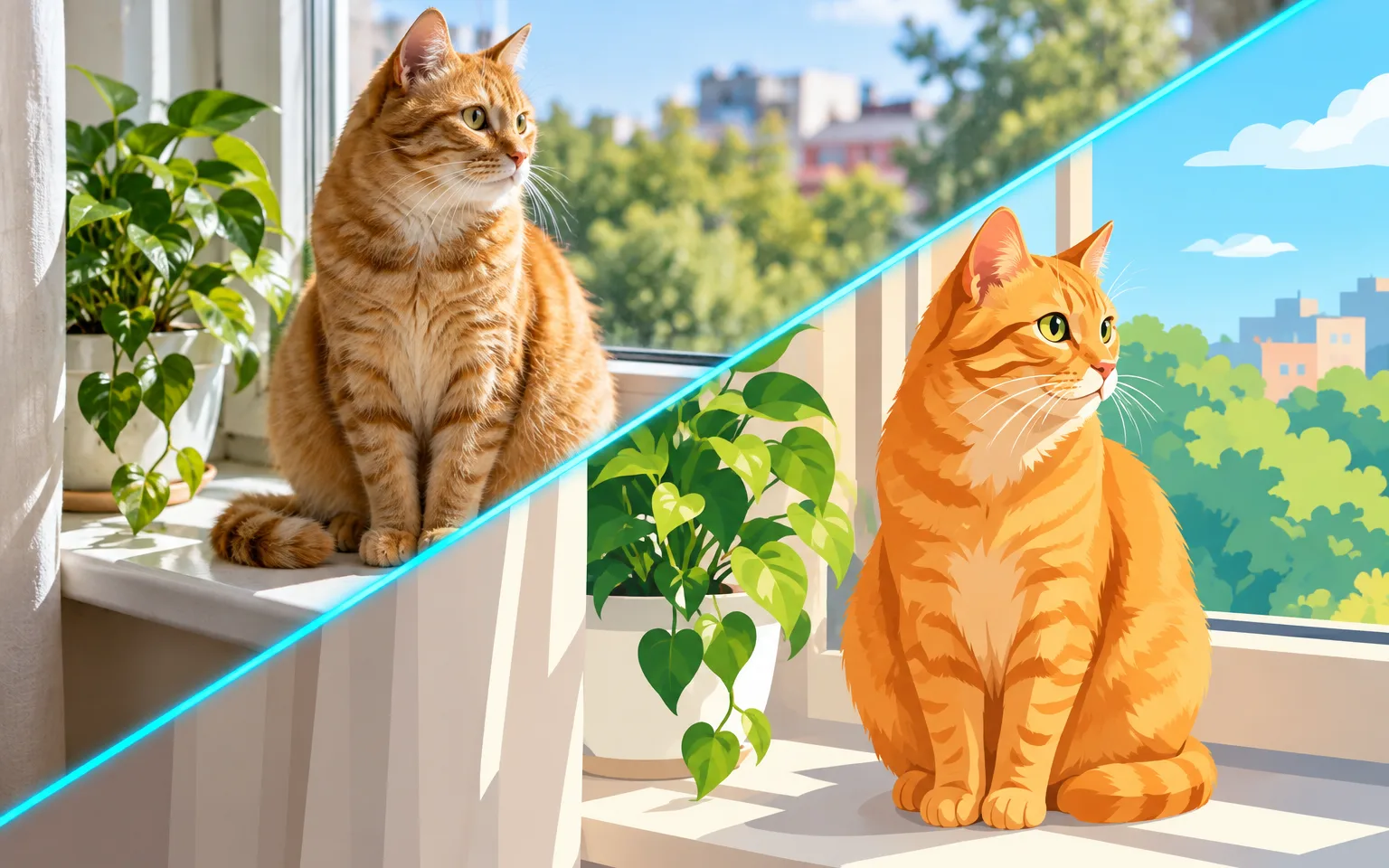
Selfies, family snapshots and pet photos become bright, friendly illustrations in the AI Photo to Cartoon Converter, and the people in them still look like themselves. Clean outlines, simplified shapes and flat colors replace photographic detail, while pose and expression follow the original. Unlike an avatar crop, the whole frame is redrawn, so backgrounds, props and every person in the shot become part of the illustration.

  • Image Upscaler
  • Image Enhancer
  • Unblur Image
  • Denoise Image
  • Face Swap
  • Camera Angle Changer
  • Image Relight
  • Background Changer
  • Watermark Remover
  • Object Remover
  • Photo to Cartoon
  • All Tools
Photo to Cartoon
Why use it

Your photo, redrawn by the AI Photo to Cartoon Converter

Bold, cheerful style

Clean outlines, simplified shapes and bright flat colors that read well even at thumbnail size. Photographic texture such as skin pores, fabric weave and busy foliage is replaced by solid areas of color, so the image stays clear on a phone screen or a small sticker.

Try it now

Keeps pose and expression

The cartoon follows the original composition and expression, so a laugh stays a laugh. Clothing colors and hairstyles carry over as well, which helps a group of friends or a family recognize who is who in the drawing.

Try it now

Optional custom details

Describe background or outfit changes and they are added in the same style. Keep the request to one or two changes, such as a sunny park or a superhero cape, so the photo still controls the composition.

Try it now

Flat color that is easy to reuse

With minimal shading and edges defined by outlines, the image drops neatly onto colored backgrounds, slides and printed goods. The AI Photo to Cartoon Converter still returns a raster image, not a vector file, so trace it in a design app if you need artwork that scales without limit.

Try it now
Capabilities

What the AI Photo to Cartoon Converter can draw

Cartoon avatars

Create a cartoon version of yourself for profiles and chat apps, keeping the framing of your original photo.

Group and family photos

Cartoonize everyone in the picture at once, with outfits and poses matching the original.

Pets as characters

Turn a pet photo into a cartoon character with plenty of personality and its real markings.

Scenes and products

Give places and products a friendly illustrated look for menus, packaging mockups and shop signs.

Sticker and merch artwork

Produce bold, flat-colored images that hold up on stickers, shirts and mugs once the background is cut away.

Classroom and slide visuals

Illustrate real places and willing participants for lessons and presentations instead of relying on generic clip art.

Made for fun, friendly visuals
Who it is for

Made for fun, friendly visuals

Social media creators

Make cartoon avatars, stickers and thumbnails that stay legible in small feeds and chat windows.

Families and parents

Create playful pictures for birthday invitations, albums and thank-you cards from everyday snapshots.

Small businesses

Illustrate team or shop photos for friendly marketing, staff pages and storefront signs.

Teachers and presenters

Add approachable illustrations of field trips, projects and events to slides and handouts.

Models

Models behind this tool

  • OpenAI logoGPT-Image-2.5OpenAI
  • OpenAI logoGPT-Image-2OpenAI
  • ByteDance logoSeedream 5.0 ProByteDance
  • ByteDance logoSeedream 5.0ByteDance
  • ByteDance logoSeedream 4.5ByteDance
  • Google logoNano Banana ProGoogle
  • Google logoNano Banana 2Google
  • Google logoNano BananaGoogle
  • Alibaba logoQwen Image 3.0 ProAlibaba
  • Alibaba logoQwen Image 3.0Alibaba
  • Black Forest Labs logoFlux 2Black Forest Labs
  • Black Forest Labs logoFlux KontextBlack Forest Labs
  • Midjourney logoMidjourneyMidjourney
  • MiniMax logoMiniMax Image 01MiniMax
  • Alibaba logoWan 2.6 ImageAlibaba
  • Alibaba logoWan 2.5 ImageAlibaba
  • xAI logoGrok ImagexAI
How it works

Cartoonize a photo with the AI Photo to Cartoon Converter

Try it now
01

Upload a photo

Add the photo you want to cartoonize. Faces that are well lit and turned toward the camera keep the strongest likeness.

02

Add details if you like

Optionally describe one or two changes, such as a new background or outfit, or leave the box empty.

03

Generate and download

Start the task, compare faces and outfits with your photo, and download your cartoon.

Tips & FAQ

Get better results

Tips

01

Use a well-lit photo where faces are clearly visible.

02

Keep extra details short, such as a plain background or a sunny park.

03

Only upload photos of people who agree to being converted.

04

Pick photos with simple backgrounds when the cartoon is meant for stickers, since fewer shapes behind the subject make it easier to cut out.

05

Check small text on signs or shirts after generating, because the flat style can simplify lettering into shapes that are no longer readable.

Frequently Asked Questions

Photo to Cartoon uses bold outlines and flat, bright colors, closer to a classic TV cartoon. Photo to Anime draws in an anime illustration style with finer line work and shaded hair and eyes. Choose anime for character art with detailed eyes and hair, and this tool for playful graphics that need to read instantly.

No. The cartoon style is applied automatically once you upload. The details box is optional and works best for a single change, like a sunny park background or a superhero cape.

Yes. Everyone in the picture is converted at once. Faces that are small or partly hidden may come out less recognizable, so group shots with clearly visible faces work best.

All three cartoonize a photo, but they return different images. This tool redraws the whole frame with outlines and flat color. Photo to 3D Cartoon renders soft, shaded characters with depth and cinematic light, like a still from an animated feature. Cartoon Avatar Maker crops a single person to a centered head-and-shoulders portrait on a solid background. Pick this converter for scenes, groups and stickers, the animated option for posters and cards, and the avatar maker for profile icons.

Simplified shapes drop fine detail on purpose, so freckles, jewelry, patterned fabric and small background objects may be merged or removed. Likeness depends on visible faces; side profiles, sunglasses and heavy shadows give the drawing less to work from. The result is a single still image, not an editable vector or a layered file.

It uses pay-as-you-go credits. The price is shown next to the Generate button before you start.

You can explore the page without signing in. Sign in when you are ready to generate.

More tools

  • Text to Image
  • Image to Image
  • Image Upscaler
  • Image Enhancer
  • Photo Restoration
  • Unblur Image
  • Image Sharpener
  • Denoise Image
  • Face Enhancer
  • Photo Retouching
  • Unpixelate Image
  • Face Swap
  • Head Swap
  • Colorize Photo
  • Camera Angle Changer
  • Image Relight
  • Change Color of Image
  • Face Editor
  • Edit Text in Image
  • Image Translator
  • Background Changer
  • Background Remover
  • Image Layer Decomposition
  • White Background
  • Blur Background
  • Change Background Color
  • Product Staging
  • Product Beautifier
  • Flat Lay Generator
  • Ghost Mannequin
  • Product Photo Generator
  • Clone Product Image
  • Watermark Remover
  • Object Remover
  • Remove Text from Image
  • People Remover
  • Photo to Anime
  • Photo to Sketch
  • Photo to Painting
  • AI Filter
  • Vintage Filter
  • Black and White Filter
  • Glitch Effect
  • Photo to 3D Cartoon
  • Cartoon Avatar Maker

See yourself drawn by the AI Photo to Cartoon Converter

Upload a photo above, add one change if you like, and download a bright cartoon version of the people, pets or places in it.

Try it now
  • Image Upscaler
  • Image Enhancer
  • Unblur Image
  • Denoise Image
  • Face Swap
  • Camera Angle Changer
  • Image Relight
  • Background Changer
  • Watermark Remover
  • Object Remover
  • Photo to Cartoon
  • All Tools