





APIXOAPIXO

Create

AI Video
AI Image
AI Audio

Library

GenerationsAssets

Explore

ModelsAI ToolsPricing
APIXOAPIXO
APIXO
APIXO

Create any content you can imagine. Trusted by millions of creators.

Support@apixo.ai

Models

Claude Sonnet 4.6
Face Swap
Flux 2
FLUX 3
Flux Kontext
Gemini 3.1 Pro Preview
Gemini Omni
GPT-5.5
GPT-Image-1
GPT-Image-2
GPT-Image-2.5
Grok Image
Grok Imagine Video 1.5
Grok Video
Hailuo 2.3
Hailuo 2.3 Fast
HappyHorse
Head Swap
Image Upscaler
Image Watermark Remover
InfiniteTalk
Kling 2.1
Kling 2.5 Turbo Pro
Kling 2.6
Kling 3.0 Omni
Kling 3.0 Std
Kling 3.0 Turbo
LTX-2 19B
Midjourney
MiniMax H3
MiniMax H3 LoRA
MiniMax Image 01
MiniMax Speech 2.8
MiniMax Voice
Nano Banana
Nano Banana 2
Nano Banana Pro
Qwen Image 3.0
Qwen Image 3.0 Pro
Seedance 1.5 Pro
Seedance 2.0
Seedance 2.0 Fast
Seedance 2.0 Mini
Seedance 2.5
Seedream 4.5
Seedream 5.0
Seedream 5.0 Pro
Sora 2
Sora 2 Pro
Suno V6
Veo 3.1
Video Upscaler
Video Watermark Remover
Vidu Q3
Wan 2.2 Animate
Wan 2.5
Wan 2.5 Image
Wan 2.6
Wan 2.6 Image
Wan 2.7
Wan 2.7 Image
Wan 3.0 Video
Wan 3.0 Video LoRA
Wan 3.0 Video Pro LoRA
Z-Image LoRA
Z-Image LoRA Pro

Product

FeaturedImage ModelsVideo ModelsAudio ModelsText Models

Resources

AffiliateCompany InformationTerms of ServicePrivacy PolicyRefund PolicyShipping / Digital Delivery Policy

Other

PricingAPI Docs

© 2026 APIXO. All rights reserved.

MODEL AVAILABILITY, PRICING, AND ROUTING CAN VARY BY PROVIDER AND REGION.

CreateGenerationsAssets
  1. Home
  2. Image Tools
  3. Photo to Anime

AI Photo to Anime Converter

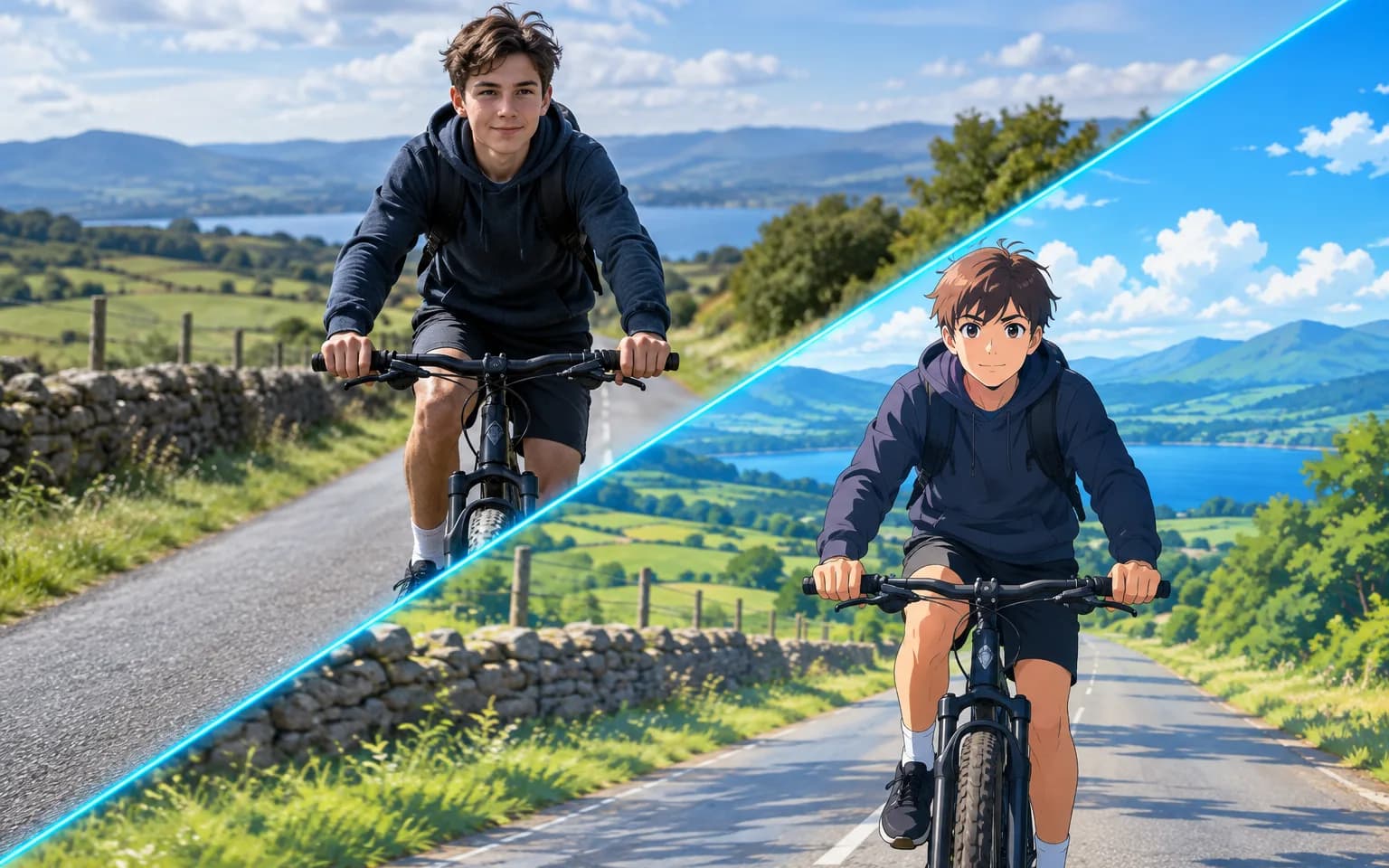
The AI Photo to Anime Converter turns a portrait, pet, product or scene into an anime-style image, using the original composition as its visual anchor. Upload a clear source, optionally describe a small creative adjustment, and compare the stylized result before choosing it for a profile, concept or campaign.

  • Image Upscaler
  • Image Enhancer
  • Unblur Image
  • Denoise Image
  • Face Swap
  • Camera Angle Changer
  • Image Relight
  • Background Changer
  • Watermark Remover
  • Object Remover
  • Photo to Anime
  • All Tools
Photo to Anime
Why use it

Why the AI Photo to Anime Converter keeps you in control

No prompt writing required

The anime direction is built into the AI Photo to Anime Converter, so you can begin from an image rather than drafting a complete illustration prompt. A clear source supplies the subject, pose and composition. Optional text is best used for a focused adjustment such as an outfit, setting or color mood instead of rewriting the whole scene.

Try it now

Keeps pose and features

The conversion uses the original face, expression, pose, clothing and framing as references while translating them into drawn forms, line work and shading. Recognition can vary with occlusion, extreme angles or small faces, so compare important identity details and do not assume every generated feature is an exact copy.

Try it now

Add your own touches

Use the optional details field to request a concrete change such as a quieter background, a different hair color or a specific atmosphere. Keeping that direction brief leaves the source image in control. You can generate another interpretation when the first balance between resemblance and style does not suit the project.

Try it now

Connect stylized and practical image workflows

When a source needs cleanup before stylizing, prepare it with Image Enhancer; when the chosen illustration is too small for a planned layout, continue with Image Upscaler. These related tools support different goals, letting you assess quality, style and output size as separate decisions rather than hiding them in one transformation.

Try it now
Capabilities

Creative directions for the AI Photo to Anime Converter

Restyle individual portraits

Translate a clear selfie or headshot into illustrated line work and shading while using the original expression, pose and framing as references.

Interpret pets as characters

Create a stylized character image from a pet photo, preserving recognizable markings and silhouette where the source makes them visible.

Explore product theme concepts

Test an anime-inspired treatment for an authorized product shot or campaign concept before deciding whether that direction fits the brand.

Reimagine complete scenes

Apply the illustrated treatment to streets, rooms and landscapes when the whole composition matters more than a single face.

Request a focused variation

Use optional text for one clear adjustment to color, clothing, atmosphere or setting while leaving the uploaded image in charge of composition.

Prepare selected art for delivery

Send the chosen illustration to Image Upscaler when a later layout needs more working pixels, after identity and factual details pass review.

Projects that benefit from a recognizable restyle
Who it is for

Projects that benefit from a recognizable restyle

Profile and channel creators

Build an illustrated avatar or thumbnail from your own portrait, then compare recognition and readability at the size where it will appear.

Gift and keepsake designers

Turn an authorized photo of a person or pet into artwork for a card, invitation or print after the pictured people approve the use.

Story and concept teams

Explore character, costume and environment directions from owned references before investing in a refined illustration or broader visual system.

Campaign and commerce teams

Test stylized treatments for approved portraits and products while keeping brand, likeness and licensing review in the production process.

Models

Models behind this tool

  • OpenAI logoGPT-Image-2.5OpenAI
  • OpenAI logoGPT-Image-2OpenAI
  • ByteDance logoSeedream 5.0 ProByteDance
  • ByteDance logoSeedream 5.0ByteDance
  • ByteDance logoSeedream 4.5ByteDance
  • Google logoNano Banana ProGoogle
  • Google logoNano Banana 2Google
  • Google logoNano BananaGoogle
  • Alibaba logoQwen Image 3.0 ProAlibaba
  • Alibaba logoQwen Image 3.0Alibaba
  • Black Forest Labs logoFlux 2Black Forest Labs
  • Black Forest Labs logoFlux KontextBlack Forest Labs
  • Midjourney logoMidjourneyMidjourney
  • MiniMax logoMiniMax Image 01MiniMax
  • Alibaba logoWan 2.6 ImageAlibaba
  • Alibaba logoWan 2.5 ImageAlibaba
  • xAI logoGrok ImagexAI
How it works

Create anime artwork with the AI Photo to Anime Converter

Try it now
01

Upload a photo

Choose a clear, well-lit source with the main subject large enough to read. For portraits, visible facial features and limited occlusion give the workflow a stronger identity reference.

02

Add details if you like

Leave the details field empty for the standard transformation, or name one or two concrete changes. Review the visible credit estimate and remove conflicting instructions before submitting.

03

Generate and download

Generate the illustration, download the selected result and compare identity, hands, lettering and key product details with the source. Create another version if the artistic interpretation changes something essential.

Tips & FAQ

Get better results

Tips

01

Use a well-lit source with the main subject clearly visible; strong occlusion and heavy filters give the model less reliable guidance.

02

Keep optional direction short and concrete, naming a specific background, outfit or mood instead of describing an unrelated replacement scene.

03

Only upload photos of people who agree to being converted, and confirm consent for the way you plan to share the result.

04

Inspect faces, hands, text and product labels because stylization can reinterpret details that appear factual in the original image.

05

Use Image Enhancer before conversion when the source needs cleanup, and Image Upscaler afterward only when the selected artwork needs more pixels.

Frequently Asked Questions

It translates the source into illustrated line work, shading and color while using its subject, pose and composition as references. The result is a new artistic interpretation, not a pixel-preserving filter. Review facial identity, text, hands and product details when those elements matter to the intended use.

A prompt is optional because the style direction is already built in. If you want a change, use a short, concrete request about a background, outfit, hair color or mood. Avoid combining many instructions that compete with the source, and leave the field empty when you simply want the standard conversion.

Clear portraits, pets, products and scenes with a readable main subject are useful starting points. Good lighting and visible features help preserve recognition, while tiny subjects, severe blur, heavy filters and important details hidden by other objects create more uncertainty. The upload control shows the current file requirements.

Generation uses pay-as-you-go credits, with the current charge determined by the selected model and available parameters. The estimate beside the Generate button is visible before submission. Review it after changing any setting so the creative choice and expected cost stay clear before you start.

No. The workflow aims to keep the subject recognizable, but anime stylization necessarily redraws shapes, textures and proportions. Strong source images usually provide better guidance, while groups, occlusion and small faces increase variation. Treat the output as creative artwork and inspect identity-sensitive or factual details before sharing it.

Commercial use depends on your rights to the source image, permission from pictured people, the selected model terms and the rules for the final project. Use only authorized material, avoid protected characters or branding you cannot license, and review the generated illustration before publishing or selling it.

More tools

  • Text to Image
  • Image to Image
  • Image Upscaler
  • Image Enhancer
  • Photo Restoration
  • Unblur Image
  • Image Sharpener
  • Denoise Image
  • Face Enhancer
  • Photo Retouching
  • Unpixelate Image
  • Face Swap
  • Head Swap
  • Colorize Photo
  • Camera Angle Changer
  • Image Relight
  • Change Color of Image
  • Face Editor
  • Edit Text in Image
  • Image Translator
  • Background Changer
  • Background Remover
  • Image Layer Decomposition
  • White Background
  • Blur Background
  • Change Background Color
  • Product Staging
  • Product Beautifier
  • Flat Lay Generator
  • Ghost Mannequin
  • Product Photo Generator
  • Clone Product Image
  • Watermark Remover
  • Object Remover
  • Remove Text from Image
  • People Remover
  • Photo to Sketch
  • Photo to Cartoon
  • Photo to Painting
  • AI Filter
  • Vintage Filter
  • Black and White Filter
  • Glitch Effect
  • Photo to 3D Cartoon
  • Cartoon Avatar Maker

Restyle your next portrait with the AI Photo to Anime Converter

Upload a clear source, add only the creative direction you need, review the estimate and generate an anime-style version for your next profile, concept or visual campaign.

Try it now
  • Image Upscaler
  • Image Enhancer
  • Unblur Image
  • Denoise Image
  • Face Swap
  • Camera Angle Changer
  • Image Relight
  • Background Changer
  • Watermark Remover
  • Object Remover
  • Photo to Anime
  • All Tools