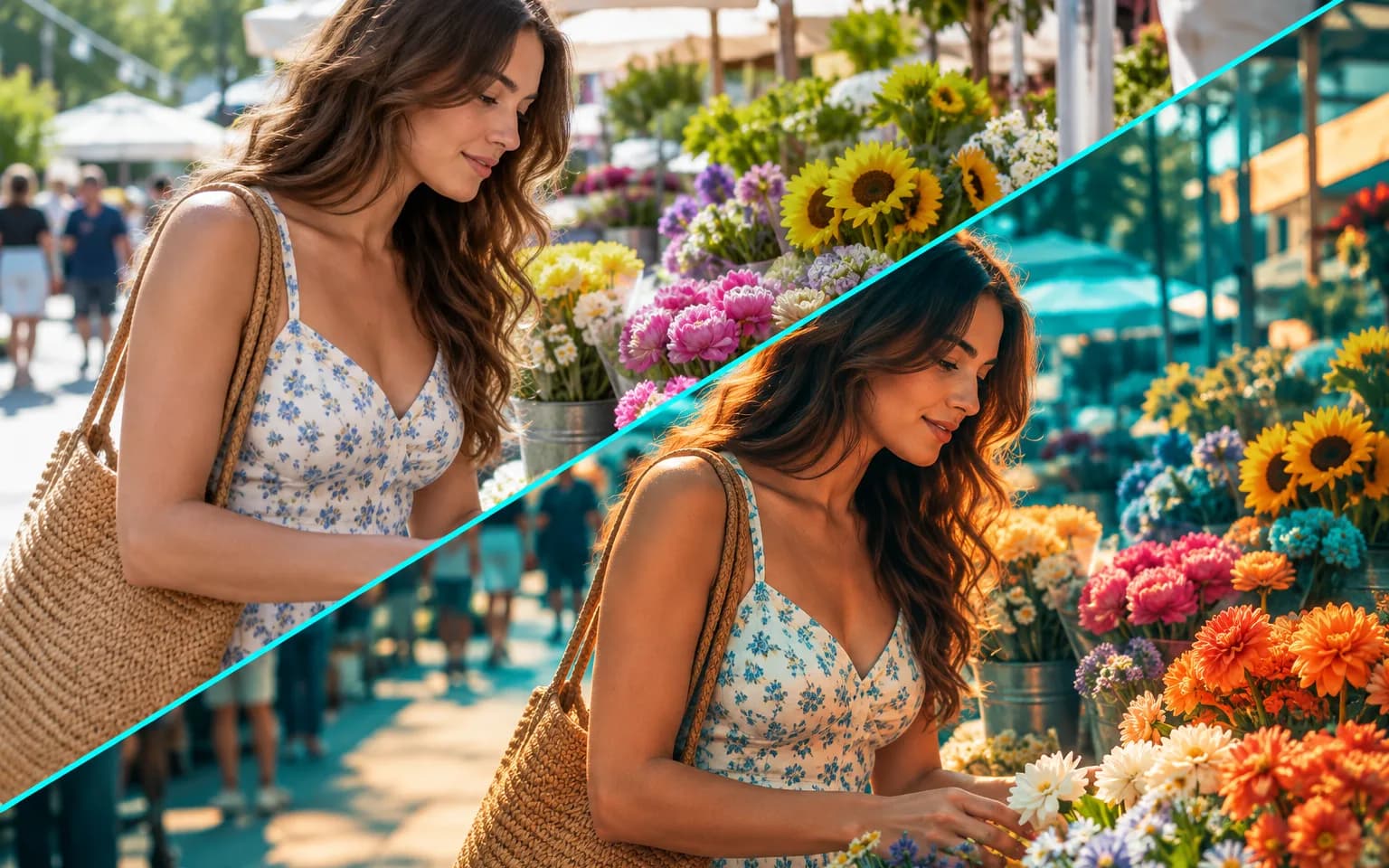

It re-grades color, tone and mood according to your description. Subjects, faces and composition are kept, so it works like a color grade rather than a redraw of the scene.


Our AI Photo Filter gives a picture a new mood from a short description, whether you want a soft cinematic grade, a pastel spring palette or crisp monochrome. Only color, tone and atmosphere are adjusted, so the people, objects and framing of your shot are kept. There is no preset list to scroll through and no LUT file to install.
Type what you have in mind, such as moody teal and orange, pastel spring or crisp black and white. The look is built from that description instead of being picked from a fixed preset list.
Try it nowNot sure what to ask for? Leave the box empty and the photo receives a soft cinematic grade with gentle contrast, a safe starting point for most portraits and landscapes. Once you see how it lands, rewrite the description to push the colors warmer, cooler or more muted.
Try it nowColor, tone and mood are adjusted while subjects, faces and composition are kept, so the result still reads as the same photograph. The AI Photo Filter does not add grain, borders or text, which keeps the output clean for further editing or layout work.
Try it nowA filter can be a whisper or a statement. Ask for a light touch of teal in the shadows, or for a heavy, desaturated bleach-bypass look, and the AI Photo Filter scales the grade to match instead of applying one fixed intensity.
Try it nowFilm-like color with gentle contrast and softened highlights, suited to travel and lifestyle shots.
Rich monochrome conversions with deep shadows and clean midtones; ask for a slight warm tint if pure gray feels cold.
Warm autumn, cool winter or bright summer tones for the same scene, without adding leaves or snow.
Reuse one description to give a series of photos a shared style; keep the exact wording in a note, because the AI Photo Filter responds to small changes in phrasing.
Deepen blues and magentas in city shots taken after dark while keeping signs and faces readable, without turning dark streets into daylight.
Lift shadows and soften colors for the clean, light look common in interiors, weddings and food photos.
Keep a recognizable look across posts without grading each one by hand in an editing app.
Match campaign photos to a brand palette before a launch goes live, and try several moods quickly before the team settles on one.
Give trip photos a signature style that ties a whole album together, even when shots came from different cameras.
Give lifestyle shots a seasonal feel for holiday promotions while the products themselves stay recognizable.
 GPT-Image-2.5OpenAIGPT-Image-2OpenAI
 Seedream 5.0 ProByteDanceSeedream 5.0ByteDanceSeedream 4.5ByteDance
 Nano Banana ProGoogleNano Banana 2GoogleNano BananaGoogle
 Qwen Image 3.0 ProAlibabaQwen Image 3.0Alibaba
 Flux 2Black Forest LabsFlux KontextBlack Forest Labs
 MidjourneyMidjourney
 MiniMax Image 01MiniMaxWan 2.6 ImageAlibabaWan 2.5 ImageAlibaba
 Grok ImagexAI
Add the photo you want to restyle, already cropped the way you plan to use it.
Describe the look you want, or leave the box empty for the default grade.
Start the task, compare the result with the original and download the filtered photo.
Describe the mood and colors, such as warm golden hour or cool blue night.
Name a color family as well as a feeling; calm, faded blue is easier to follow than make it nice.
Reuse the same description to give several photos a matching look.
For a retro film look, try the Vintage Filter.
A grade shifts every color in the frame, so when product or brand colors must stay accurate, ask to keep them natural and compare the result with the original.
It re-grades color, tone and mood according to your description. Subjects, faces and composition are kept, so it works like a color grade rather than a redraw of the scene.
A soft cinematic color grade with gentle contrast. It suits most portraits, street scenes and landscapes, and you can run the photo again later with your own description.
Choose this open-ended tool when you want to invent a look in your own words. The Black and White Filter is tuned only for monochrome, so it gives a refined conversion even with an empty box. The Vintage Filter adds what a color grade leaves out, such as film grain, faded color and a soft vignette.
It will not replace a grey sky with a sunset, add fog or rain, or blur the background, because those change content rather than color. It also cannot fix a blurry or noisy photo, and it cannot copy the look of a reference image, since only one photo is uploaded; describe the reference in words instead.
Yes. Run each photo with the same description. Results can differ slightly from image to image, so compare them side by side before you publish.
It uses pay-as-you-go credits. The price is shown next to the Generate button before you start.
You can explore the page without signing in. Sign in when you are ready to generate.
Upload a photo above and describe the mood you want, or keep the default grade.
Try it now