
No. Only color, contrast, grain and vignette are changed, and the photo comes back without borders, stamps or text on top.


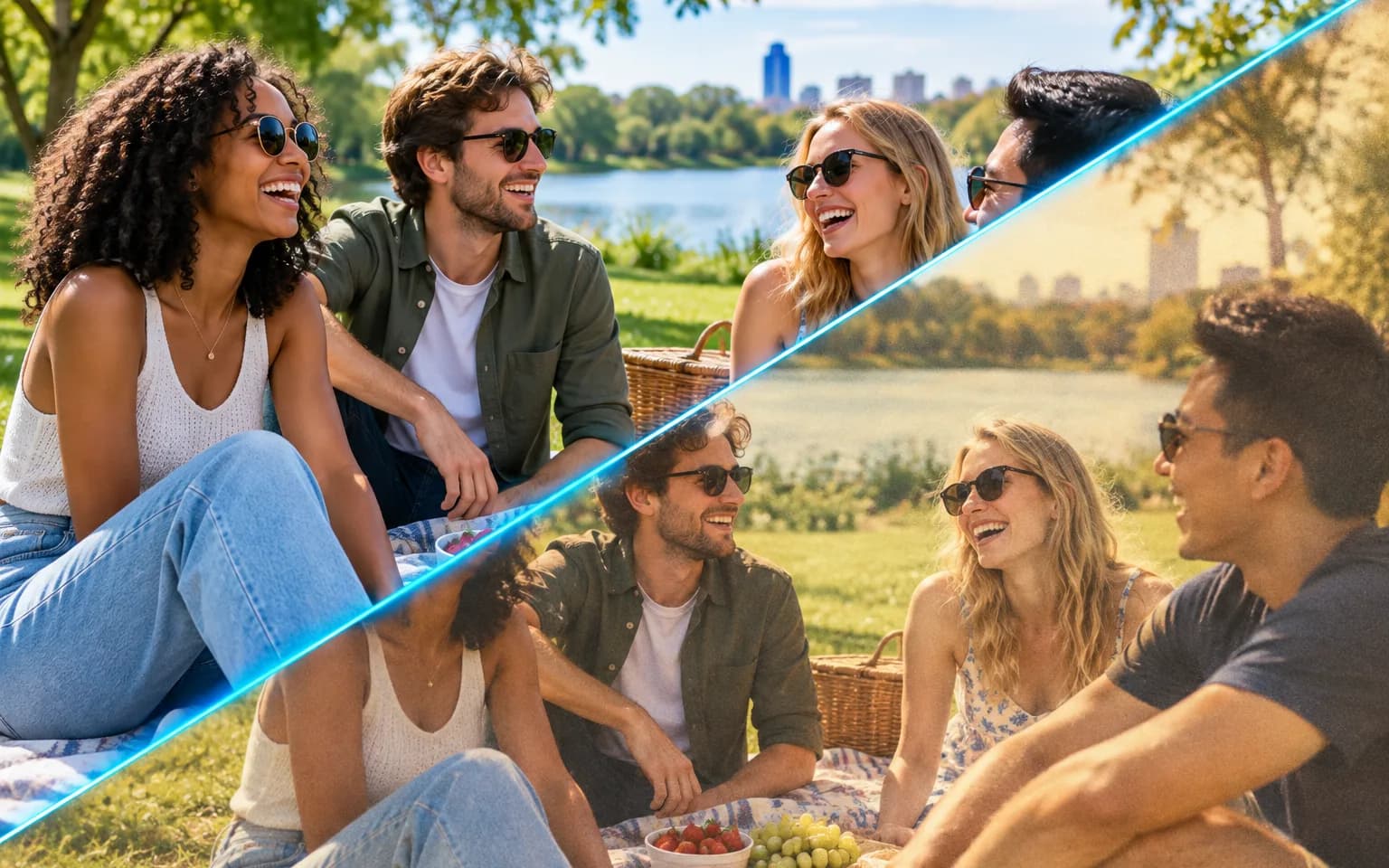
Make a new photo feel like it came out of a shoebox of old prints with the AI Vintage Filter: warm faded color, soft contrast, fine grain and gently darkened corners. Faces, places and framing are kept, so it still looks like your picture, just from another decade. It is a color and texture grade rather than a restoration or a redraw, so it will not repair scratches, add period clothing or change what is in the scene.
Highlights turn creamy, shadows lift slightly and saturated colors settle into softer, warmer tones, like a print that spent years in a family album. The shift is applied across the whole frame, so sky, skin and clothing age together instead of in separate patches.
Try it nowFine grain adds the texture of film stock, and slightly darker corners pull the eye toward the middle of the frame. Both stay subtle by default; ask for stronger grain or a heavier vignette when you want the analog character to be obvious at a glance.
Try it nowColor, contrast, texture and mood change, while subjects, shapes and composition stay where they were. Nothing is added, removed or redrawn, which separates the AI Vintage Filter from restyling tools that reinterpret the whole picture as a painting or a cartoon.
Try it nowWarm analog film is the default, but the details box accepts a decade, a mood or a film character, such as a washed-out seventies print, a cool early digital compact or a faded black and white. The grade follows that description while the content of the photo stays untouched.
Try it nowWarm analog color like a point-and-shoot print collected from a photo lab, with soft highlights and gentle grain.
Describe a decade or style in the details box, from sun-bleached seventies color to the cooler tones of early digital cameras.
Ask for an aged monochrome print with lifted blacks and soft grain instead of a crisp, modern conversion.
The look is applied without date stamps, borders or text, so the frame stays clean for your own layout.
Reuse one description across photos from the same event so an album or carousel shares a similar grade, then compare them side by side.
Request heavier grain, deeper vignetting or more faded color when a subtle grade feels too close to the original.
Post photos with a retro aesthetic and keep a feed visually consistent without hand-tuning every image.
Give menus, event flyers and posts a cozy analog style that suits a warm interior or a handmade product.
Make wedding, travel and holiday snapshots feel timeless for albums, prints and anniversary cards.
Create retro visuals for campaigns, throwback promotions and events without reshooting anything on film.
 GPT-Image-2.5OpenAIGPT-Image-2OpenAI
 Seedream 5.0 ProByteDanceSeedream 5.0ByteDanceSeedream 4.5ByteDance
 Nano Banana ProGoogleNano Banana 2GoogleNano BananaGoogle
 Qwen Image 3.0 ProAlibabaQwen Image 3.0Alibaba
 Flux 2Black Forest LabsFlux KontextBlack Forest Labs
 MidjourneyMidjourney
 MiniMax Image 01MiniMaxWan 2.6 ImageAlibabaWan 2.5 ImageAlibaba
 Grok ImagexAI
Add the photo you want to give a retro look. Bright, evenly exposed shots take the warm grade most naturally.
Optionally name an era, film style or grain strength, or leave the box empty for warm analog film.
Start the task, compare the grade with your original, and download your vintage photo.
Name an era or film style in the details box for a specific look.
Bright daylight photos take on the warm film look especially well.
For other moods, such as cinematic or seasonal color, try AI Filter.
Start from a sharp, well-exposed photo; the AI Vintage Filter adds softness and grain but does not recover detail lost to blur or heavy compression.
Repair a scratched or torn print with Photo Restoration first, because this grade leaves existing damage in place.
No. Only color, contrast, grain and vignette are changed, and the photo comes back without borders, stamps or text on top.
Yes. Name the era or film style in the details box, such as a faded seventies print or a cool early digital look, and the grade follows that description.
AI Filter creates whatever mood you describe, from cinematic to seasonal. This tool is tuned for retro film looks, so grain, fading and vignetting are added by default without you having to ask.
Both feel retro, but they borrow from different kinds of old technology. This tool imitates analog film, with faded warm color, soft contrast, fine grain and a slight vignette, and every shape stays in place. Glitch Effect imitates broken digital and video signals, splitting color channels and displacing whole rows of the image. Choose the film grade for keepsakes, food and lifestyle posts, and the glitch look when you want visible disruption for music or tech visuals.
It reproduces the color, contrast and texture of old prints, but it does not change the content. Modern phones, cars, logos and clothing in the frame stay modern, and no creases, stains or torn corners are added. For a convincing period image, start from a photo whose subject already fits the era you describe.
It uses pay-as-you-go credits. The price is shown next to the Generate button before you start.
You can explore the page without signing in. Sign in when you are ready to generate.
Upload a photo above, name an era if you have one in mind, and download a version that looks printed on film rather than captured on a phone.
Try it now