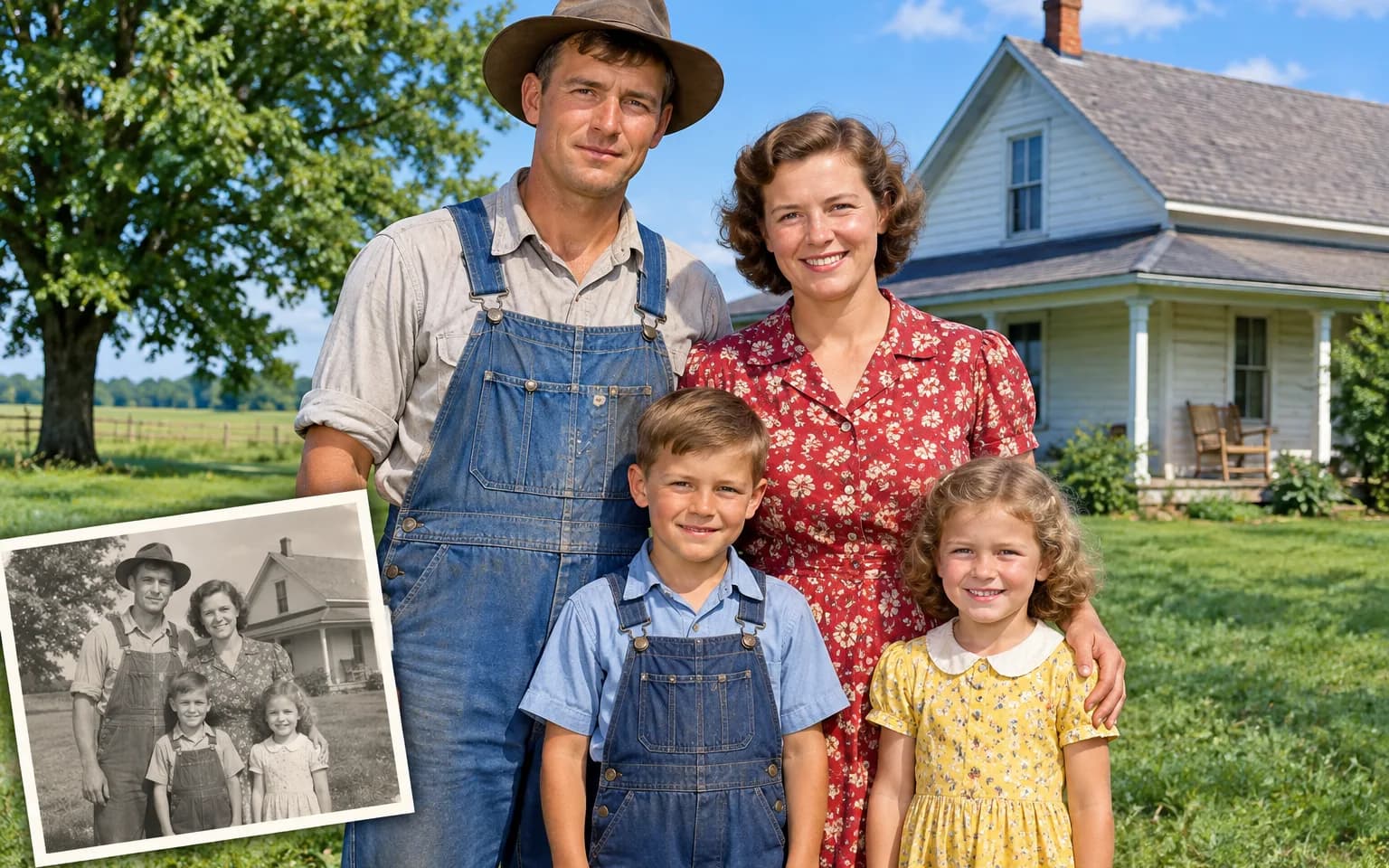

They are a realistic reconstruction based on what the scene contains, not a record of the day. If you know a real color, such as a uniform or a family car, name it in the details box to guide the result.


Old family prints and archive shots come back to life in the AI Photo Colorizer, which adds natural, believable color to black-and-white images. Faces, clothing, sky and foliage are colored to suit the scene, while the shapes and composition of the original are kept. You can leave it fully automatic or name the colors you already know.
Faces and hands get believable, even color instead of the orange cast that quick filters often leave. Lips, cheeks and the shadows around the eyes receive subtle variation, so a face does not look like a single flat tint.
Try it nowSky, foliage, brick, fabric and metal are each colored in a way that suits the scene and its light. An overcast street gets muted tones, while a sunny beach gets warmer sand and a deeper blue sky.
Try it nowShapes, faces and composition stay as they were; the photo gains color without being redrawn. Grain, lighting and the original crop are also kept, which helps the colorized version stay faithful to the print it came from.
Try it nowThe AI Photo Colorizer is instructed to choose colors appropriate to both the scene and its period. Old cars, uniforms, shop fronts and wallpaper lean toward the dyes and paints of their time instead of bright modern colors that would feel out of place.
Try it nowGive old family portraits lifelike skin, hair and clothing colors, with eye color left subtle unless you name it.
Bring color to historic scenes, towns and nature shots, from market streets to mountain views.
Revive prints whose colors have almost disappeared; the AI Photo Colorizer rebuilds the palette rather than only boosting saturation.
Name a color for a dress, car or wall in the details box, and the rest is colored around it.
Replace a brown or blue photographic tint with full natural color across the whole frame; hand-tinted prints are recolored as a whole, so painted accents may change.
Give each person in a class, team or wedding photo distinct, believable clothing and skin colors, though matching outfits may still get slightly different shades.
See grandparents and old family moments in color, and share them with relatives who never saw the originals.
Make archive images more vivid for videos and articles, noting that the color is a reconstruction.
Create color versions of vintage imagery you have rights to use, and check that the license also covers altered versions.
Turn a black-and-white photo into a colorful print or card for an anniversary or reunion.
 GPT-Image-2.5OpenAIGPT-Image-2OpenAI
 Seedream 5.0 ProByteDanceSeedream 5.0ByteDanceSeedream 4.5ByteDance
 Nano Banana ProGoogleNano Banana 2GoogleNano BananaGoogle
 Qwen Image 3.0 ProAlibabaQwen Image 3.0Alibaba
 Flux 2Black Forest LabsFlux KontextBlack Forest Labs
 MidjourneyMidjourney
 MiniMax Image 01MiniMaxWan 2.6 ImageAlibabaWan 2.5 ImageAlibaba
 Grok ImagexAI
Add a black-and-white, sepia or faded photo, scanned as sharply as possible.
Optionally name colors you know, or leave the box empty.
Start the task, compare the colors with anything you remember, and download the colorized photo.
Repair scratches first with Photo Restoration; damage can pick up odd colors.
If you know real colors, such as a uniform or a car, name them in the details box.
Colors are an informed reconstruction, not a record of the original scene.
Scan or photograph the print flat, in even light and without glare, since reflections on glossy paper can be mistaken for pale objects.
Keep the black-and-white original next to the colorized copy, and say that the color was added when you share historical images.
They are a realistic reconstruction based on what the scene contains, not a record of the day. If you know a real color, such as a uniform or a family car, name it in the details box to guide the result.
Yes. Faded prints are fine, but scratches and stains can pick up odd colors, so run heavily damaged pictures through Photo Restoration first for a cleaner result.
It reads what is in the picture, such as skin, fabric, leaves and sky, and picks colors typical for those materials under that light. Anything it cannot infer, like the exact shade of a coat, is a plausible guess unless you name it.
They work in opposite directions. The colorizer adds color to a monochrome or faded picture, while the Black and White Filter turns a color photo into a styled monochrome image. They are not a round trip: colorizing a converted photo produces new guessed colors, not the ones it started with, so keep your color original.
No. Colorizing adds color but does not add resolution or recover lost detail, and on very small scans colors can blur across edges. Scan the print as large as you can, or use Image Enhancer on a soft file before colorizing it.
It uses pay-as-you-go credits. The price is shown next to the Generate button before you start.
You can explore the page without signing in. Sign in when you are ready to generate.
Upload a black-and-white photo above and add natural color, guided by any details you know.
Try it now