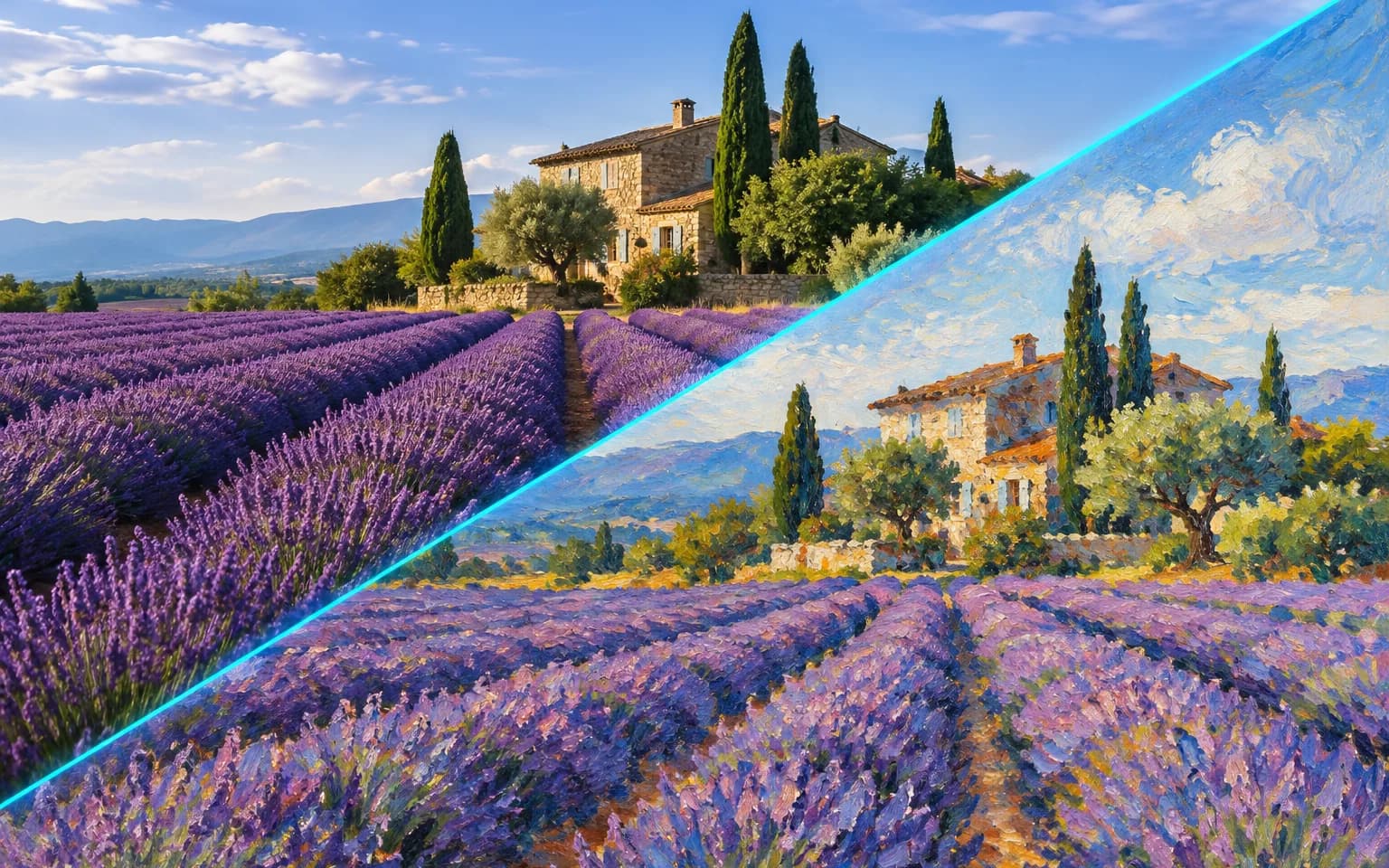

Oil painting is the default. Ask for watercolor, gouache, impressionist or another painted look in the details box, and add a palette such as soft pastels if you have one in mind.


Give a favorite snapshot the look of a canvas with the AI Photo to Painting Converter, which renders it as an oil painting by default or in watercolor, gouache or impressionist style on request. Pose, features and composition follow the original, so the subject stays recognizable under the brushwork. The result is a digital image with a painted surface, ready for screens and prints rather than a physical canvas.
Visible brushstrokes, rich color and painterly light by default, like a commissioned portrait. Strokes follow the forms in the photo, so a cheek, a sleeve or a cloud is described by the direction of the paint rather than by photographic texture.
Try it nowAsk for watercolor, gouache or impressionist style in the details box. Watercolor brings soft washes with paper showing through, gouache gives flat and opaque color, and an impressionist request breaks light into short, broken strokes.
Try it nowPose, features and composition follow the original photo. Because paint simplifies texture, very small details such as jewelry, fine print or distant faces may be softened or merged into the surrounding brushwork.
Try it nowThe AI Photo to Painting Converter returns the painting without an added signature, text, watermark or picture frame. That leaves the image ready for a print layout, a greeting card or a digital frame of your choice, with any lettering added by you afterwards.
Try it nowTurn a portrait into a gallery-style painting worth framing, with skin tones built up from layered strokes.
Paint travel and nature photos in oil or watercolor, where skies, water and foliage suit loose brushwork.
Create a painted portrait of a dog, cat or horse that keeps coat color and markings visible.
Switch between oil, watercolor, gouache and impressionist styles with a few words in the details box.
Paint a family house, a wedding venue or a favorite street corner as a keepsake for movers, hosts or travelers.
Add a palette such as soft pastels, earthy tones or a limited range of blues to match a room or a card design.
Make a painted portrait of family, a couple or a pet for birthdays, anniversaries and memorial keepsakes.
Turn favorite shots into painted wall art that sits comfortably next to prints and framed originals.
Share artistic versions of your photos and give a series one consistent painted style.
Create painted visuals for menus, book covers, event posters and seasonal campaigns.
 GPT-Image-2.5OpenAIGPT-Image-2OpenAI
 Seedream 5.0 ProByteDanceSeedream 5.0ByteDanceSeedream 4.5ByteDance
 Nano Banana ProGoogleNano Banana 2GoogleNano BananaGoogle
 Qwen Image 3.0 ProAlibabaQwen Image 3.0Alibaba
 Flux 2Black Forest LabsFlux KontextBlack Forest Labs
 MidjourneyMidjourney
 MiniMax Image 01MiniMaxWan 2.6 ImageAlibabaWan 2.5 ImageAlibaba
 Grok ImagexAI
Add the photo you want painted. A well-lit image where the main subject fills much of the frame gives the brushwork enough to describe.
Optionally name a painting style or palette, or leave the box empty for a classic oil painting.
Start the task, check faces and fine details against your photo, and download your painting.
Name the medium you want, such as watercolor or impressionist oil, for a specific look.
Photos with good light and a clear subject translate best into paint.
Only upload photos of people who agree to being painted.
Crop close to the subject before uploading, because distant faces and tiny details tend to dissolve into the brushwork.
Ask for one medium at a time; mixing oil, watercolor and ink in a single request tends to produce a muddled surface.
Oil painting is the default. Ask for watercolor, gouache, impressionist or another painted look in the details box, and add a palette such as soft pastels if you have one in mind.
Yes. The subject, pose and composition are kept so the painting is clearly the same scene.
It works well for cards, posters and small framed prints. For larger wall art, run the finished painting through Image Upscaler first so the brushstrokes stay crisp at print size.
Choose by the medium you want on the wall. This tool works in color and paint, building forms from brushstrokes, washes and blended light, with oil as the default. Photo to Sketch works in graphite line and shading on white paper and stays monochrome unless you ask otherwise. Paintings suit framed gifts and colorful covers, while sketches suit invitations, architectural keepsakes and designs where clean lines matter more than color.
Brushwork simplifies texture, so small text, logos, jewelry and distant faces may be softened, merged or slightly reinterpreted. The file has a painted look but no real canvas weave or raised paint, so a flat paper print will stay flat. Check identity-sensitive details before printing, and generate again if an important feature has drifted.
It uses pay-as-you-go credits. The price is shown next to the Generate button before you start.
You can explore the page without signing in. Sign in when you are ready to generate.
Upload a photo above, name a medium or leave it to oil, and download a painted version ready for a card, a frame or a feed.
Try it now