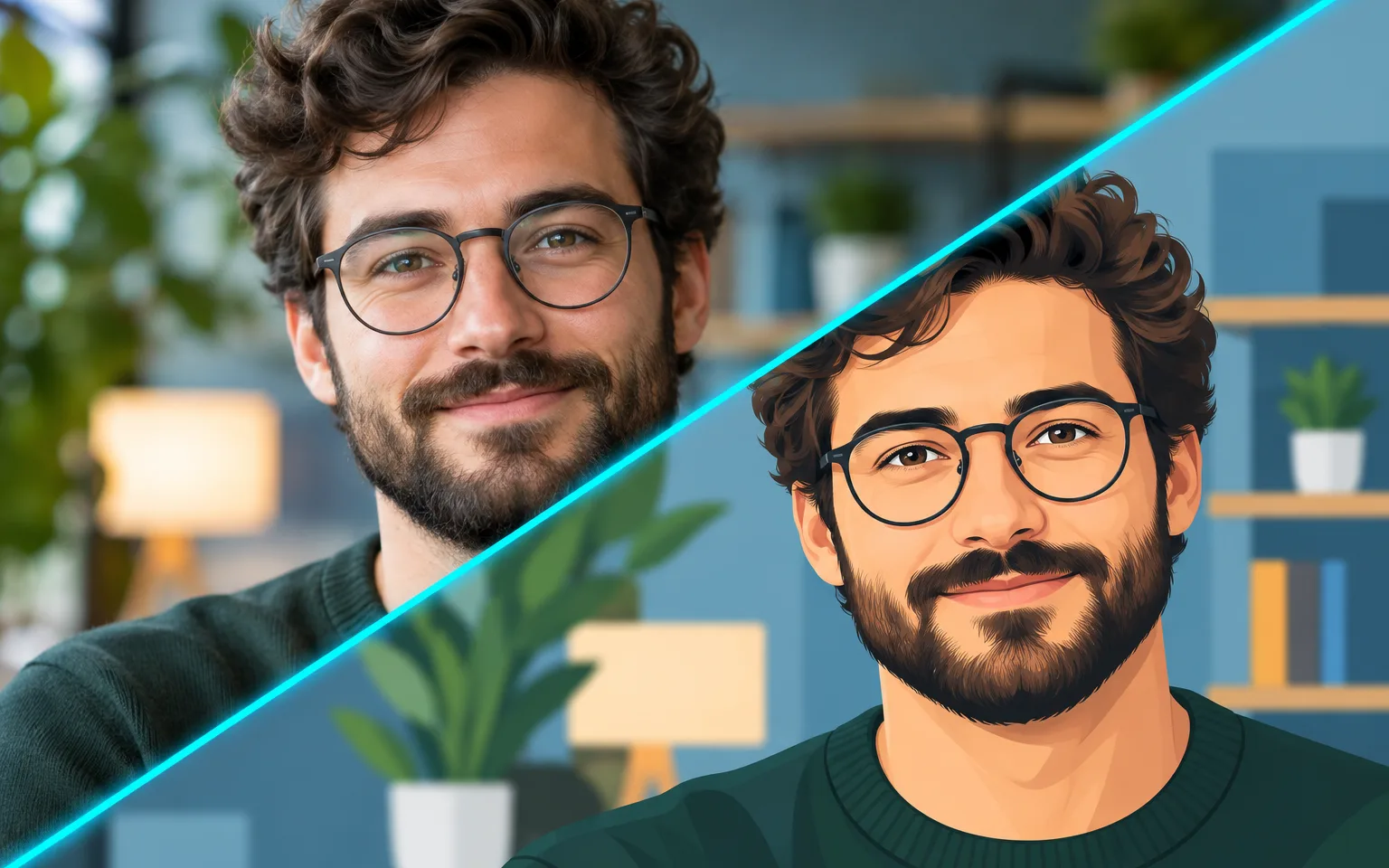

A centered head-and-shoulders cartoon portrait with bold outlines and flat, friendly colors on a simple background. Small details such as a smile, a hat or the background color can be steered with a few words.


With the AI Cartoon Avatar Maker, a single portrait photo becomes a clean cartoon profile picture, centered and framed for the small circles that social apps use. Your hairstyle, skin tone and glasses carry over, so friends still recognize you at a glance. It is built for one person and one small icon, so it deliberately leaves the rest of the scene behind instead of cartoonizing the whole photo.
A centered head-and-shoulders portrait on a clean background, composed to survive the circular crop most apps apply. The face sits in the middle with room around it, so nothing important is trimmed away when a platform rounds off the corners.
Try it nowHairstyle, hair color, skin tone and glasses carry over, so the drawing still reads as you rather than a generic character. Face shape and distinctive details such as freckles, a beard or a dimple are kept when the photo shows them clearly.
Try it nowName a background color to match your brand, your team palette or simply your favorite shade. A solid color keeps the avatar readable against busy app interfaces and makes a set of team portraits look coordinated.
Try it nowThe AI Cartoon Avatar Maker is instructed to draw a single person without extra people, text, frames or watermarks. That keeps the icon uncluttered, but it also means group scenes, full-body poses and the original background are not carried into the result.
Try it nowOne consistent avatar for every account, from email to forums, that stays recognizable at small sizes.
Matching cartoon portraits that give a team page one illustrated style when everyone requests the same background color.
Friendly avatars for communities, streams and chat servers that show your likeness without posting a real photo.
Add a hat, a wider smile or a new background color with a few words.
Ask for headphones, a scarf or a woolly hat when you want the avatar to hint at a hobby or a season.
Upload a current portrait to replace an old profile picture while keeping the same cartoon approach across accounts.
Use an approachable avatar on work tools, chat and email where a formal headshot feels too stiff.
Give your about page a consistent illustrated style without booking a photographer or commissioning an illustrator.
Create a recognizable profile icon for overlays, community servers and channel pages.
Keep one cartoon avatar across every platform so followers spot you quickly in comments and lists.
 GPT-Image-2.5OpenAIGPT-Image-2OpenAI
 Seedream 5.0 ProByteDanceSeedream 5.0ByteDanceSeedream 4.5ByteDance
 Nano Banana ProGoogleNano Banana 2GoogleNano BananaGoogle
 Qwen Image 3.0 ProAlibabaQwen Image 3.0Alibaba
 Flux 2Black Forest LabsFlux KontextBlack Forest Labs
 MidjourneyMidjourney
 MiniMax Image 01MiniMaxWan 2.6 ImageAlibabaWan 2.5 ImageAlibaba
 Grok ImagexAI
Add a clear portrait photo. A front-facing shot with the face and shoulders visible gives the best likeness.
Optionally name a background color or accessory, or leave the box empty.
Start the task, check the likeness at a small size, and download your avatar.
Use a front-facing photo with your face and shoulders visible.
Name a background color in the details box to match your brand.
Only upload photos of people who agree to being converted.
Crop to one person before uploading; when several faces are visible, the tool has to guess and may blend their features.
Preview what the AI Cartoon Avatar Maker returns inside a small circle before using it, and pick a background that contrasts with your hair and the app interface.
A centered head-and-shoulders cartoon portrait with bold outlines and flat, friendly colors on a simple background. Small details such as a smile, a hat or the background color can be steered with a few words.
It works best with one person in the frame. Crop a group shot to a single face first; otherwise the tool has to guess whose avatar you want.
A front-facing, evenly lit shot with your face and shoulders fully visible. Heavy filters, sunglasses or strong side shadows hide the features the drawing relies on.
Use this tool when the goal is a profile icon: it isolates one person, centers the head and shoulders and places them on a solid color. Photo to Cartoon redraws the entire photo, including the background, other people and props, in a similar flat style. For a soft, shaded character with cinematic light, Photo to 3D Cartoon is the better match, and Photo to Anime suits an anime-style portrait.
It will not add your name, a logo, a border or extra people, and it drops the original background, hands and anything below the shoulders. Profiles, sunglasses, hats that hide the hairline and strong filters all reduce what the drawing can keep. If a detail such as a birthmark or a particular hairstyle matters to you, mention it in the details box.
It uses pay-as-you-go credits. The price is shown next to the Generate button before you start.
You can explore the page without signing in. Sign in when you are ready to generate.
Upload a portrait above, pick a background color if you like, and download a profile-ready avatar that still looks like you.
Try it now