





APIXOAPIXO

Create

AI Video
AI Image
AI Audio

Library

GenerationsAssets

Explore

ModelsAI ToolsPricing
APIXOAPIXO
APIXO
APIXO

Create any content you can imagine. Trusted by millions of creators.

Support@apixo.ai

Models

Claude Sonnet 4.6
Face Swap
Flux 2
FLUX 3
Flux Kontext
Gemini 3.1 Pro Preview
Gemini Omni
GPT-5.5
GPT-Image-1
GPT-Image-2
GPT-Image-2.5
Grok Image
Grok Imagine Video 1.5
Grok Video
Hailuo 2.3
Hailuo 2.3 Fast
HappyHorse
Head Swap
Image Upscaler
Image Watermark Remover
InfiniteTalk
Kling 2.1
Kling 2.5 Turbo Pro
Kling 2.6
Kling 3.0 Omni
Kling 3.0 Std
Kling 3.0 Turbo
LTX-2 19B
Midjourney
MiniMax H3
MiniMax H3 LoRA
MiniMax Image 01
MiniMax Speech 2.8
MiniMax Voice
Nano Banana
Nano Banana 2
Nano Banana Pro
Qwen Image 3.0
Qwen Image 3.0 Pro
Seedance 1.5 Pro
Seedance 2.0
Seedance 2.0 Fast
Seedance 2.0 Mini
Seedance 2.5
Seedream 4.5
Seedream 5.0
Seedream 5.0 Pro
Sora 2
Sora 2 Pro
Suno V6
Veo 3.1
Video Upscaler
Video Watermark Remover
Vidu Q3
Wan 2.2 Animate
Wan 2.5
Wan 2.5 Image
Wan 2.6
Wan 2.6 Image
Wan 2.7
Wan 2.7 Image
Wan 3.0 Video
Wan 3.0 Video LoRA
Wan 3.0 Video Pro LoRA
Z-Image LoRA
Z-Image LoRA Pro

Product

FeaturedImage ModelsVideo ModelsAudio ModelsText Models

Resources

AffiliateCompany InformationTerms of ServicePrivacy PolicyRefund PolicyShipping / Digital Delivery Policy

Other

PricingAPI Docs

© 2026 APIXO. All rights reserved.

MODEL AVAILABILITY, PRICING, AND ROUTING CAN VARY BY PROVIDER AND REGION.

CreateGenerationsAssets
  1. Home
  2. Image Tools
  3. Change Color of Image

AI Image Color Changer

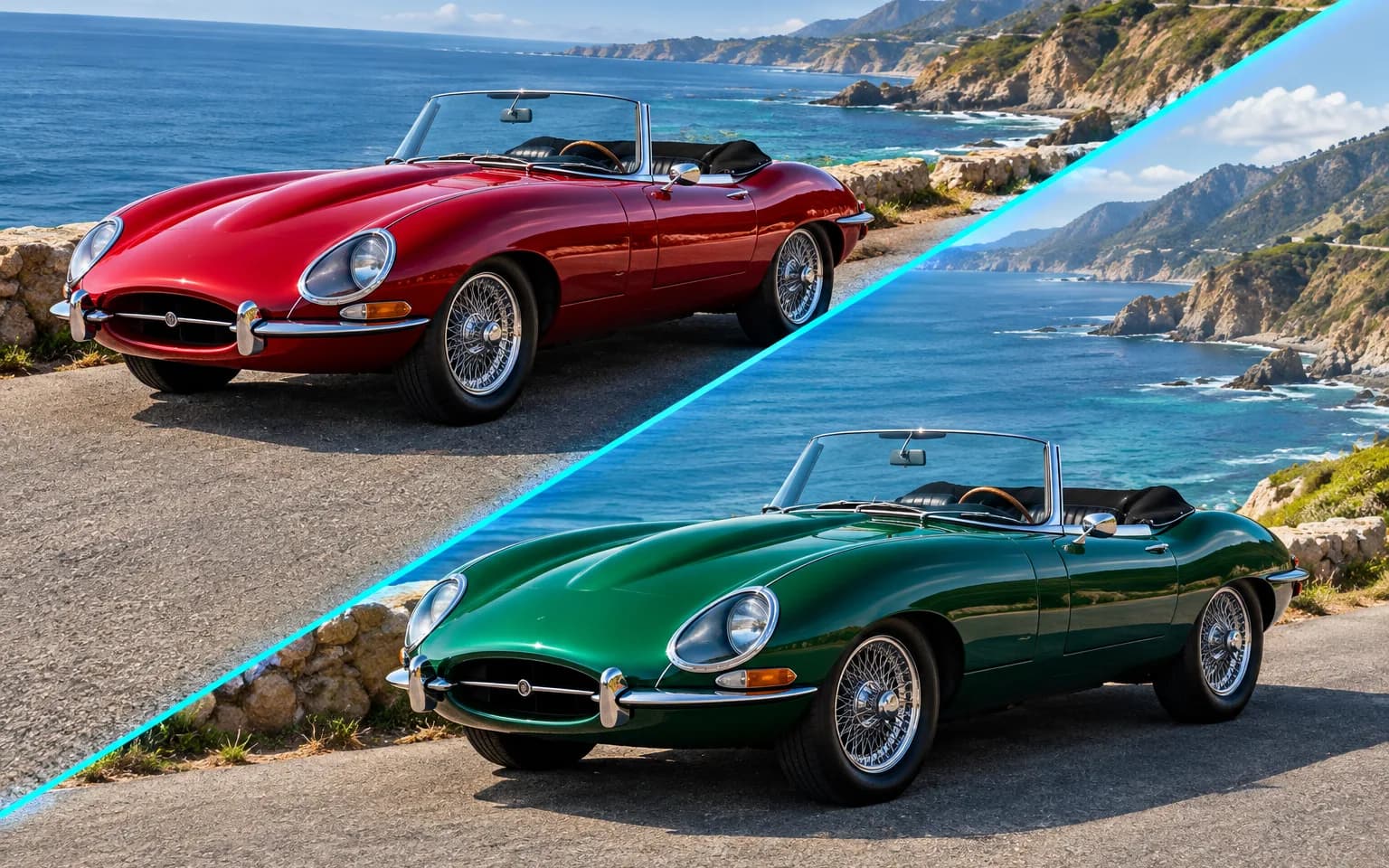
AI Image Color Changer recolors one specific object in a photo, such as a dress, a car or a wall, from a short description of what to change. Shading, folds and reflections are kept, so the new color looks as if it was there when the picture was taken. There is no masking or brush work; naming the object is enough.

  • Image Upscaler
  • Image Enhancer
  • Unblur Image
  • Denoise Image
  • Face Swap
  • Camera Angle Changer
  • Image Relight
  • Change Color of Image
  • Background Changer
  • Watermark Remover
  • Object Remover
  • All Tools
Change Color of Image
Why use it

Recolor exactly what you describe

Target one object

Name the item, such as the jacket or the front door, and only that item takes on the new color. Position words help when the scene is busy, for example the chair nearest the window.

Try it now

Realistic material

Shading, folds, texture and reflections are kept, so leather still looks like leather and paint still catches the light. Matte surfaces stay matte and glossy ones keep their highlights after the color changes.

Try it now

Everything else stays

Other colors, shapes and the background are left alone, which makes before-and-after comparisons easy. Skin tones and nearby objects are protected from the new color, so a red shirt does not tint the face above it.

Try it now

Choose how much counts

The description decides the boundary of the edit. Ask for the car body but not the wheels, only the sleeves of a sweater, or the cabinet doors without the handles, and AI Image Color Changer limits the recolor to that part.

Try it now
Capabilities

What AI Image Color Changer can recolor

Clothing colorways

Preview a garment in other colorways before ordering samples, with its seams and folds intact.

Cars and products

Try different paint or finish colors on a car, a sneaker or a gadget, with highlights still running along the curves.

Walls and interiors

Preview a new wall, cabinet or sofa color before buying paint or fabric. AI Image Color Changer keeps the light falloff of the room, so shaded corners stay darker.

Hair color previews

See what a different hair color could look like on the current cut; for a new hairstyle, the Face Editor is the better fit.

Trims and details

Recolor small parts such as laces, piping, straps or a bag handle while the main piece stays the same.

Props and styling

Shift a vase, a cushion or a bouquet to suit the palette of a styled shoot without restaging it.

For trying colors before committing
Who it is for

For trying colors before committing

E-commerce sellers

Show product color variants from one photo instead of a new shoot, as long as each variant is actually sold in that color.

Interior designers

Preview paint and fabric choices for clients on a photo of their own room.

Fashion creators

Explore outfit color ideas quickly before buying or dyeing a piece.

Designers and marketers

Match photos to a campaign palette by bringing one prop or garment into the brand color.

Models

Models behind this tool

  • OpenAI logoGPT-Image-2.5OpenAI
  • OpenAI logoGPT-Image-2OpenAI
  • ByteDance logoSeedream 5.0 ProByteDance
  • ByteDance logoSeedream 5.0ByteDance
  • ByteDance logoSeedream 4.5ByteDance
  • Google logoNano Banana ProGoogle
  • Google logoNano Banana 2Google
  • Google logoNano BananaGoogle
  • Alibaba logoQwen Image 3.0 ProAlibaba
  • Alibaba logoQwen Image 3.0Alibaba
  • Black Forest Labs logoFlux 2Black Forest Labs
  • Black Forest Labs logoFlux KontextBlack Forest Labs
  • Midjourney logoMidjourneyMidjourney
  • MiniMax logoMiniMax Image 01MiniMax
  • Alibaba logoWan 2.6 ImageAlibaba
  • Alibaba logoWan 2.5 ImageAlibaba
  • xAI logoGrok ImagexAI
How it works

How to use AI Image Color Changer

Try it now
01

Upload your photo

Add the photo with the object you want to recolor, ideally with that object clearly visible.

02

Describe the change

Name the object and the new color, plus any parts that should keep their original color.

03

Generate and download

Start the task, check edges and patterns, then download the recolored photo.

Tips & FAQ

Get better results

Tips

01

Name both the object and the color, for example the sofa in deep navy blue.

02

If several similar objects are present, say which one, such as the car on the left.

03

With the box empty, the main subject’s most prominent clothing is recolored.

04

Descriptive color names such as dusty rose, forest green or charcoal grey are followed more closely than plain words like red or blue.

05

Printed patterns, stripes and logos on the object may be simplified or recolored unevenly, so inspect them before using the image.

Frequently Asked Questions

It recolors the most prominent clothing on the main subject with a complementary color. That is a handy demo, but naming the object and the color yourself gives far more predictable results, especially when the photo contains several people or garments.

Color names work best, such as sage green or burnt orange. The result is a close visual match rather than a guaranteed color value, so compare it with your swatch before using it for print or product specs.

This tool starts from a photo that already has color and swaps the color of one object you name. The Photo Colorizer starts from a black-and-white or badly faded picture and adds natural color to the whole scene. Use the colorizer for old prints, and the color changer when a modern photo just needs a different shade on one item.

Yes, garments are one of the most common uses. Name the piece, such as the red scarf or the denim jacket, together with the new color; folds and fabric texture stay in place so it still looks like real cloth.

Extreme jumps, such as black to white, are the least predictable because dark surfaces show little texture to rebuild from. Glass, chrome and mirrored finishes mostly reflect their surroundings, so a new color can look painted on. Small or partly hidden objects may also leave a thin edge in the old color.

It uses pay-as-you-go credits. The price is shown next to the Generate button before you start.

You can explore the page without signing in. Sign in when you are ready to generate.

More tools

  • Text to Image
  • Image to Image
  • Image Upscaler
  • Image Enhancer
  • Photo Restoration
  • Unblur Image
  • Image Sharpener
  • Denoise Image
  • Face Enhancer
  • Photo Retouching
  • Unpixelate Image
  • Face Swap
  • Head Swap
  • Colorize Photo
  • Camera Angle Changer
  • Image Relight
  • Face Editor
  • Edit Text in Image
  • Image Translator
  • Background Changer
  • Background Remover
  • Image Layer Decomposition
  • White Background
  • Blur Background
  • Change Background Color
  • Product Staging
  • Product Beautifier
  • Flat Lay Generator
  • Ghost Mannequin
  • Product Photo Generator
  • Clone Product Image
  • Watermark Remover
  • Object Remover
  • Remove Text from Image
  • People Remover
  • Photo to Anime
  • Photo to Sketch
  • Photo to Cartoon
  • Photo to Painting
  • AI Filter
  • Vintage Filter
  • Black and White Filter
  • Glitch Effect
  • Photo to 3D Cartoon
  • Cartoon Avatar Maker

Try a new shade with AI Image Color Changer

Upload a photo above and describe what to recolor, such as the jacket in olive green.

Try it now
  • Image Upscaler
  • Image Enhancer
  • Unblur Image
  • Denoise Image
  • Face Swap
  • Camera Angle Changer
  • Image Relight
  • Change Color of Image
  • Background Changer
  • Watermark Remover
  • Object Remover
  • All Tools