APIXOAPIXO

Create

AI VideoAI ImageAI Music

Library

Assets

Explore

AI TemplatesAI ModelsAI Tools
Upgrade
APIXOAPIXO
APIXO
APIXO

Create any content you can imagine. Trusted by millions of creators.

Support@apixo.ai

Models

Seedream 5.0 Pro
Seedream 4.5
Seedance 2.5
Wan 3.0 Video
Seedance 1.5 Pro
GPT-Image-2
Seedream 5.0
Seedance 2.0 Mini
Nano Banana 2
Seedance 2.0
MiniMax H3 LoRA
Seedance 2.0 Fast
Head Swap
Wan 2.7
Nano Banana Pro
GPT-Image-2.5
Wan 3.0 Video LoRA
Suno V6
Kling 2.6

AI Tools

Image ToolsVideo ToolsBackground RemoverImage Layer Decomposition

AI Templates

AI Image TemplatesAI Video TemplatesHalloween AIAI Halloween Poster GeneratorAI Baby Dance VideoHotel Lobby AI Video Generator

Product

FeaturedImage ModelsVideo ModelsAudio ModelsText ModelsOpenClawBusiness API

Resources

BlogAffiliateCompany InformationTerms of ServicePrivacy PolicyRefund PolicyShipping / Digital Delivery Policy

Other

PricingAPI pricingAPI Docs

© 2026 APIXO. All rights reserved.

MODEL AVAILABILITY, PRICING, AND ROUTING CAN VARY BY PROVIDER AND REGION.

CreateAssets
  1. Home
  2. AI Video Templates
  3. Hotel Lobby AI Video Generator

Hotel Lobby AI Video Generator

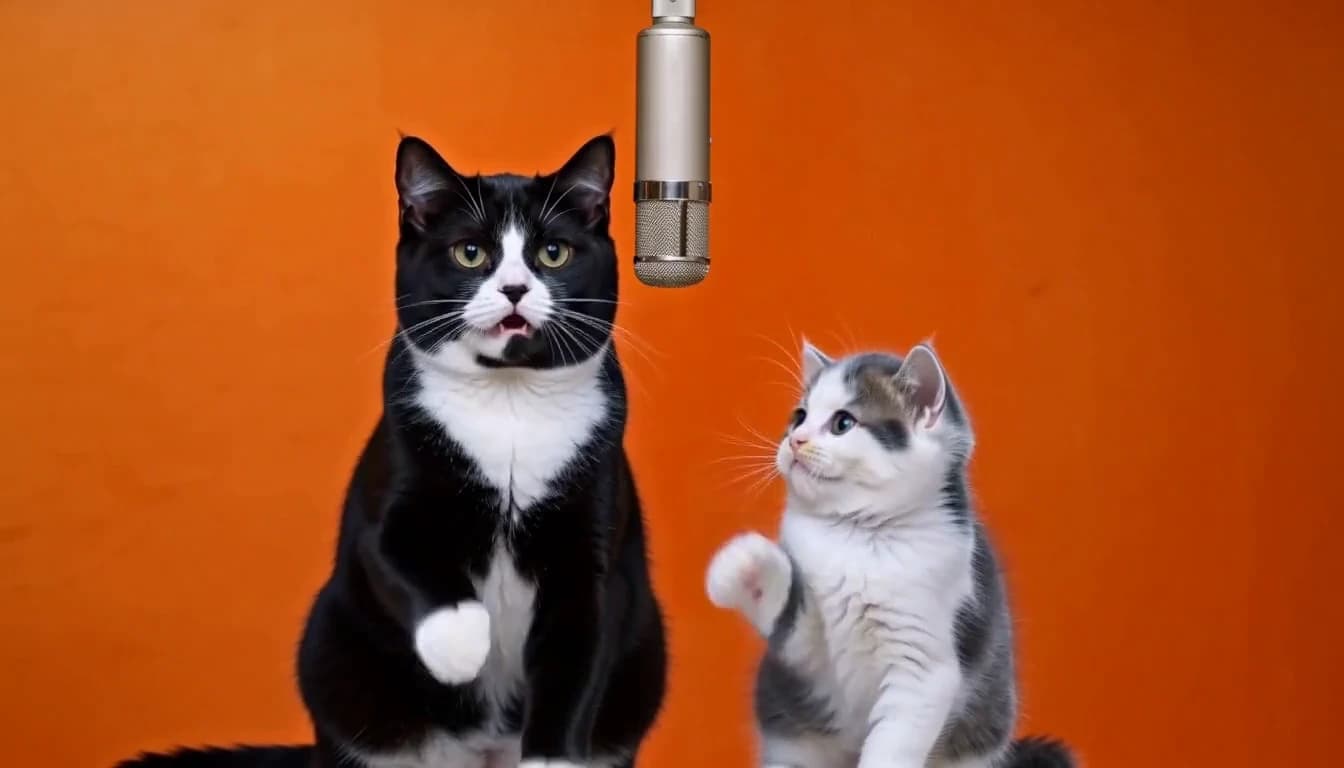
Put your characters into the orange-studio rap performance. The motion video is already included: upload 1–2 clear character photos, choose a reference-video model, and add your own creative direction.

Hotel Lobby AI Video Generator
AI Templates
Hotel Lobby AI Video GeneratorAI Baby Dance Video
Why use it

Your characters, one familiar stage

Motion reference included

The template supplies the orange studio, shared microphone, and performance reference. You provide the characters rather than finding and uploading a motion clip.

One or two character photos

One photo supplies the left performer while the right performer follows the motion reference. With two photos, the first supplies the left performer and the second supplies the right.

Choose a reference-video model

The reference video is ready in the materials. Select a model, review its settings, and optionally describe the changes you want.

Add your own prompt

The template already describes identity, position, motion, and stage. Use the prompt field to add a focused direction for appearance, lighting, or performance.

Build a Hotel Lobby performance around your characters

A familiar stage with a different cast

The Hotel Lobby look is easy to recognize: an orange studio, a suspended microphone, and a pair of performers responding to each other. This template brings those visual ingredients into a photo-to-video workflow. Your uploaded images describe the cast, while the included motion clip guides the performance. The aim is a new scene built around your characters, with consistent positions and recognizable details throughout the shot.

Use separate portraits, pet photos, or artwork of characters you created, or choose the duo-photo mode for one image containing both characters. Images do not need an orange background or microphone. With separate images, the first defines A on the left and the second defines B on the right. With a duo photo, its left and right subjects define A and B. Check the labels or swap roles before generating.

Make the replacement clear before adding a style

The template instructions ask the model to replace the original performers completely. Uploaded characters should occupy their own positions, rather than appear as extra figures beside the original cast. This matters especially for pets: a cat should retain a coherent feline body, not become a fur layer over a visible person. Review the opening, middle, and ending for leftover faces, extra heads, merged bodies, or a character that changes sides.

Keep optional directions focused on the result you want. For example, ask for a playful exchange, a confident delivery, softer lighting, or the outfits shown in your photos. Avoid asking for a crowd, scene changes, or extra performers if you want a clean composition. When a result looks crowded, simplify the character images and remove competing instructions before trying another version.

Choose the model, framing, and soundtrack together

Start with the default model or compare another reference-video model from the selector. Available resolutions, output lengths, and aspect ratios depend on that model. A wider frame can leave more room between the characters; a vertical frame can suit a short social clip, but needs enough space around the microphone and gestures. Begin with a short, lower-resolution attempt to assess the identities and movement, then choose a higher-quality setting for another generation if needed.

Sound is included by default. You can describe dialogue, language, voice, or music mood in your prompt, but audio behavior differs across models. Some generate sound with the video; others may preserve source audio. Neither a motion reference nor a written instruction guarantees a copy of its song, voices, lyrics, or exact mouth timing. Listen to the output and check the selected model before relying on a particular soundtrack.

From a quick experiment to a clip worth keeping

A useful first attempt answers a few practical questions: are the characters recognizable, do they stay in the right positions, and does the motion feel natural? Watch the entire result rather than choosing from a single attractive frame. Pay attention when a face turns away, a paw or hand passes the microphone, or the performers move close together. Those moments reveal identity drift and overlapping anatomy that a cover image can hide.

Keep the version you prefer and download it, or add it to your assets for later use. The session keeps your attempts together so you can compare settings and return to the same idea. A friends duet, a pet performance, or a personal celebration can each begin with the same preset; the character photos and your optional direction make the result specific to you.

Capabilities

Make the performance your own

Character identity

Your photos guide facial features, hair, clothing, and overall appearance. Reference inputs guide the model but do not guarantee exact identity preservation.

Reference-led movement

The built-in clip guides gestures, head turns, body rhythm, timing, and camera framing. Inspect fast movement and occluded faces in the result.

Continuous studio shot

The preset asks for a steady continuous shot, both performers visible, and one hanging microphone in a plain burnt-orange studio.

Model-specific controls

Sound is always included. Choose the resolution, duration, and aspect ratio supported by your model. Video-reference duration can contribute to the billable seconds.

Ideas for your Hotel Lobby duo
Who it is for

Ideas for your Hotel Lobby duo

Friends and couples

Bring two recognizable people into the same performance, even when their photos were taken separately.

Pets and original characters

Try clear photos of pets or artwork of your own characters. Character interpretation varies by model.

Personal celebrations

Make a playful duet for a birthday or a shared memory, then check the generated performance before sharing it.

Creative variations

Compare models or change one creative direction at a time while keeping the same character and motion references.

Models

Models behind this tool

  • Alibaba logoWan 3.0 Video LoRAAlibaba
  • ByteDance logoSeedance 2.5ByteDance
  • ByteDance logoSeedance 2.0ByteDance
How it works

How to make a Hotel Lobby AI video

Try it now
01

Upload your characters

Add 1–2 clear photos with recognizable faces and outfits. Photo 1 goes on the left; photo 2, if supplied, goes on the right.

02

Choose a model and direction

The reference video is ready in the materials. Select a model, review its settings, and optionally describe the changes you want.

03

Generate and review

Review the estimated credits before generating. Watch the result and check identities, left and right positions, gestures, framing, and sound before downloading.

Tips & FAQ

Get better results

Tips

01

Use one clearly visible character per photo, with consistent facial details and an identifiable outfit.

02

Keep the photo order consistent: photo 1 on the left, photo 2 on the right. Check for identity mixing or position swaps in the result.

03

Change one main instruction at a time so you can compare results against the same references.

04

Generated sound does not guarantee the original Hotel Lobby recording or exact lip synchronization. Review the soundtrack separately.

Frequently Asked Questions

Yes. The preset already describes the stage, character positions, and reference-led performance. Leave the creative direction blank to use those instructions, or add a short note to guide the style. Retrying a template attempt also uses the preset, so an empty optional prompt should not stop it.

A reference-video model can mix appearance from the motion clip with the uploaded identities. The preset asks for complete character replacement and no extra performers, but the result still needs review. Use clear individual photos and avoid directions that introduce more characters. Try another supported model if the cast remains mixed.

The example shows a finished character performance. The motion reference is a separate video already selected in the materials. Your new generation uses that reference and your uploaded character photos; the example is there to help you judge the look of the effect.

It can. Models have different limits for source clips and generated output, and some share a total duration budget across both. The template chooses a compatible reference clip for the selected model. Use the available duration options and read their help text; a longer source clip does not automatically mean a longer output.

Yes. In separate-photo mode, one individual photo defines the left performer. To customize both performers, add a second individual photo or choose the duo-photo mode and upload one photo containing both characters.

No. The Hotel Lobby motion video is preloaded in this template. You only need to upload your character photos.

Yes. Describe your creative direction, dialogue, language, voice, or music mood in the prompt field. Your instructions are combined with the template; available sound features and the result depend on the selected model.

The workbench shows an estimate for the selected model and settings. Video-reference duration can contribute to the cost, and final billing follows the model's rules.

No model guarantees exact identity, choreography, or synchronization. Review the whole video and check faces, hands, positions, framing, and sound.

More tools

  • Text to Video
  • Image to Video
  • Reference to Video
  • Video to Video
  • AI Talking Photo
  • Motion Control
  • Video Upscaler
  • Video Watermark Remover
  • Remove Subtitles from Video
  • AI Video Extender
  • Video Character Swap

Create your Hotel Lobby performance

Upload your characters, choose a model, and bring your duo to the orange studio.

Try it now
  • BlogHotel Lobby AI Video: References, Prompts, and a Two-Person Workflow