
No. Only use it on videos you own or have permission to modify.


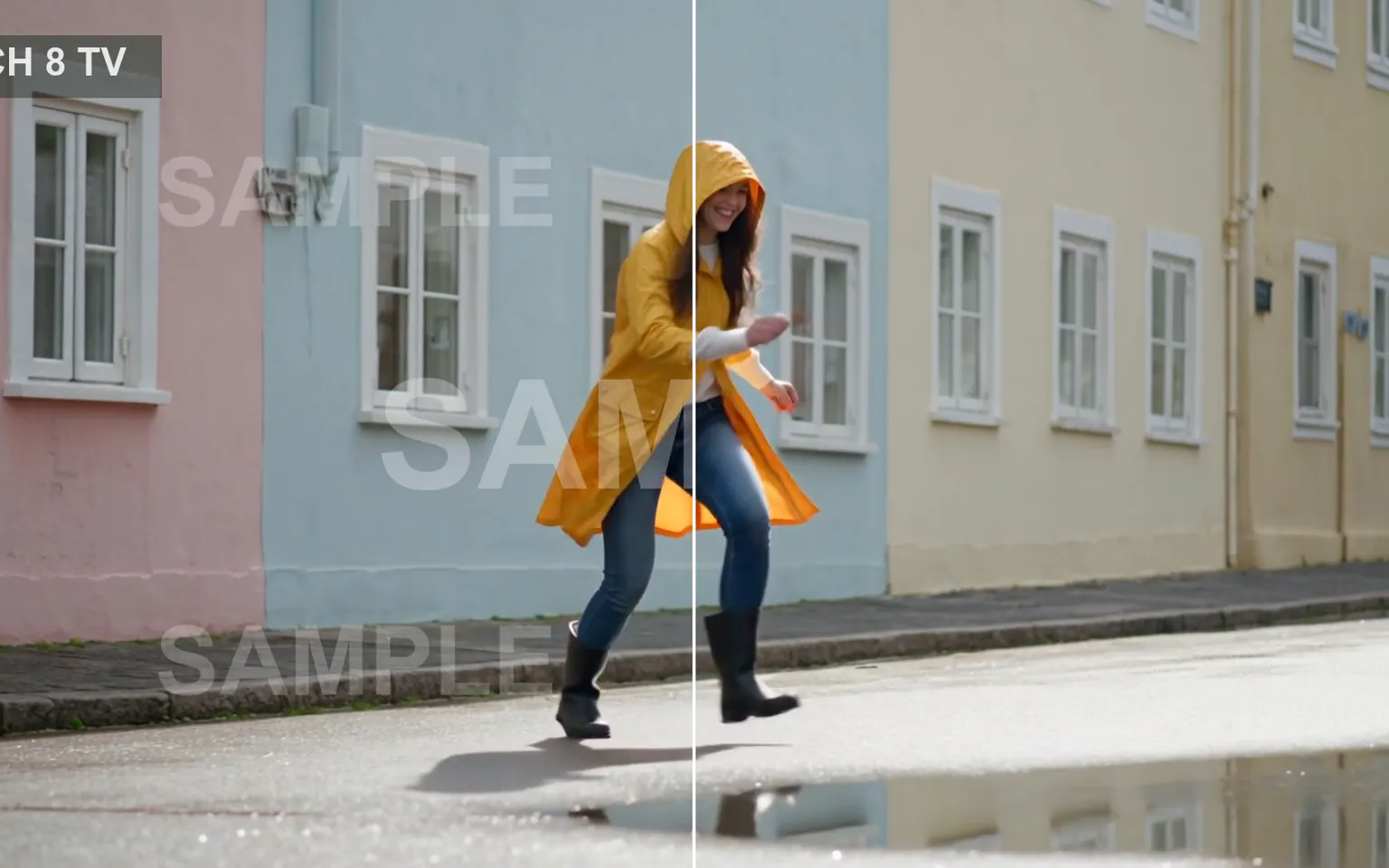
AI Video Watermark Remover cleans visible watermarks, logos, timestamps, and text overlays from videos you own or have permission to modify. Upload an authorized clip, review the estimate, and let the workflow reconstruct covered areas across the sequence.
Upload the authorized source and let the workflow detect and process visible overlays over time. This avoids building masks and tracking paths manually for every section where a mark remains on screen or changes position.
Try it nowThe workflow focuses on rebuilding the marked area while retaining the source sequence, timing, and movement. Results vary with what lies behind the overlay, so busy textures and fast motion deserve close review.
Try it nowUse it on your own videos or videos you are authorized to edit, such as cleaning up your own drafts and exports. Removing a mark does not transfer copyright, license rights, consent, or permission to redistribute the underlying footage.
Try it nowAfter cleanup, use AI Video Upscaler when the same owned source needs higher-resolution delivery, or Video to Video AI when you also have permission to transform its visual direction.
Try it nowClean logos, text, timestamps, or draft overlays from videos you own or have permission to modify, without manually editing every frame.
Process the marked region across the clip so the reconstructed background follows surrounding content instead of being patched as unrelated still images.
Upload the approved source and let the workflow handle detection, which reduces repetitive setup when an overlay persists or changes position.
Keep the original clip timing, cuts, and action while the covered area is rebuilt, then inspect that area throughout the result.
Remove obsolete review marks from your own exports or licensed project files before returning the footage to an editing or delivery workflow.
Use AI Video Upscaler after cleanup when an authorized source also needs a higher-resolution delivery, or Video to Video AI for creative transformation.
Remove obsolete preview marks from personal exports and drafts when the original clean project is unavailable or inconvenient to render again.
Clean licensed or in-house campaign footage that still carries an approved draft label before adapting it for another authorized placement.
Tidy client-owned clips and internal review exports before they return to a final cut, presentation, or documented asset library.
Clean authorized screen recordings, product walkthroughs, and internal drafts when an outdated label obscures information needed in the current version.
Add a clip you own or are allowed to edit, preferably using the least-compressed original available for more surrounding detail.
Confirm the visible credit estimate and submit the task; the workflow handles overlay detection without a manual tracking setup.
Watch the complete result and examine reconstructed regions during camera movement, subject crossings, detailed textures, and scene changes before publishing.
Only upload videos you own or have permission to modify.
Trim the clip to the part you need; billing follows the clip length.
Marks over fast motion or busy detail are harder to reconstruct, so review those moments closely.
Use the highest-quality authorized source available because heavy compression leaves less surrounding detail for reconstructing the covered region.
Watch the complete result before publishing and check moving edges, faces, text, and patterned backgrounds for visible reconstruction artifacts.
No. Only use it on videos you own or have permission to modify.
An AI Video Watermark Remover identifies a visible logo, watermark, timestamp, or text overlay and reconstructs the covered region through the clip. It is a cleanup workflow for footage you are authorized to edit, not a way to acquire rights to someone else’s work.
The upload control shows the current file requirements for the workflow. Use the highest-quality authorized source available, because heavy compression, blur, and limited surrounding detail make a covered background harder to reconstruct cleanly.
The task uses pay-as-you-go credits based on the applicable processing parameters. The current estimate appears beside the Generate button before submission, so you can check the expected charge for the uploaded clip before deciding to proceed.
No cleanup method can guarantee a perfect reconstruction. Large overlays, fast movement, changing light, detailed backgrounds, and marks that cover faces or important objects can produce visible artifacts. Watch the entire result and keep the original source available for comparison.
Only when you already have the necessary rights for the underlying footage and intended use. Removing a watermark does not create ownership or expand a license. Confirm your authorization, any talent or brand permissions, and the applicable distribution terms before commercial publication.
Upload a clip you own or may edit, review the visible estimate, process the overlay, and inspect the complete cleaned result above.
Try it now