





APIXOAPIXO

Create

AI Video
AI Image
AI Audio

Library

GenerationsAssets

Explore

ModelsAI ToolsPricing
APIXOAPIXO
APIXO
APIXO

Create any content you can imagine. Trusted by millions of creators.

Support@apixo.ai

Models

Claude Sonnet 4.6
Face Swap
Flux 2
FLUX 3
Flux Kontext
Gemini 3.1 Pro Preview
Gemini Omni
GPT-5.5
GPT-Image-1
GPT-Image-2
GPT-Image-2.5
Grok Image
Grok Imagine Video 1.5
Grok Video
Hailuo 2.3
Hailuo 2.3 Fast
HappyHorse
Head Swap
Image Upscaler
Image Watermark Remover
InfiniteTalk
Kling 2.1
Kling 2.5 Turbo Pro
Kling 2.6
Kling 3.0 Omni
Kling 3.0 Std
Kling 3.0 Turbo
LTX-2 19B
Midjourney
MiniMax H3
MiniMax H3 LoRA
MiniMax Image 01
MiniMax Speech 2.8
MiniMax Voice
Nano Banana
Nano Banana 2
Nano Banana Pro
Qwen Image 3.0
Qwen Image 3.0 Pro
Seedance 1.5 Pro
Seedance 2.0
Seedance 2.0 Fast
Seedance 2.0 Mini
Seedance 2.5
Seedream 4.5
Seedream 5.0
Seedream 5.0 Pro
Sora 2
Sora 2 Pro
Suno V6
Veo 3.1
Video Upscaler
Video Watermark Remover
Vidu Q3
Wan 2.2 Animate
Wan 2.5
Wan 2.5 Image
Wan 2.6
Wan 2.6 Image
Wan 2.7
Wan 2.7 Image
Wan 3.0 Video
Wan 3.0 Video LoRA
Wan 3.0 Video Pro LoRA
Z-Image LoRA
Z-Image LoRA Pro

Product

FeaturedImage ModelsVideo ModelsAudio ModelsText Models

Resources

AffiliateCompany InformationTerms of ServicePrivacy PolicyRefund PolicyShipping / Digital Delivery Policy

Other

PricingAPI Docs

© 2026 APIXO. All rights reserved.

MODEL AVAILABILITY, PRICING, AND ROUTING CAN VARY BY PROVIDER AND REGION.

CreateGenerationsAssets
  1. Home
  2. Image Tools
  3. Image Translator

AI Image Translator

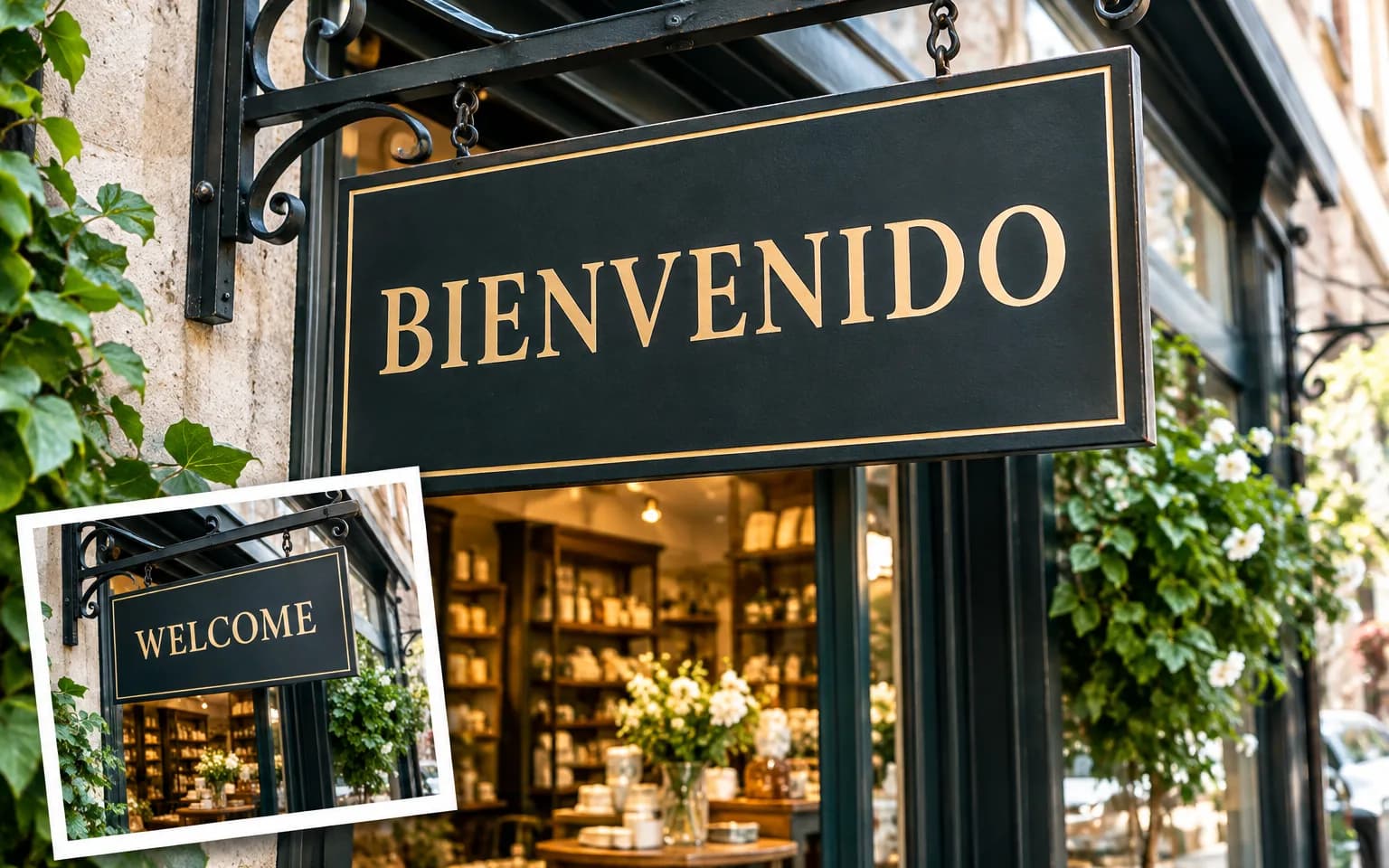
AI Image Translator translates visible wording inside a graphic while keeping its subjects, background and layout recognizable. Upload one image, name the target language, and generate a localized visual; when no language is specified, the tool translates the detected text into English by default.

  • Image Upscaler
  • Image Enhancer
  • Unblur Image
  • Denoise Image
  • Face Swap
  • Camera Angle Changer
  • Image Relight
  • Image Translator
  • Background Changer
  • Watermark Remover
  • Object Remover
  • All Tools
Image Translator
Why use it

Translate image text while preserving visual context

Translate words inside the visual

The workflow edits text where it appears instead of returning a separate plain translation. This can make a poster, product graphic, menu, comic panel or screenshot easier to share with another audience without manually rebuilding every text region.

Try it now

Use an explicit target language

Name the destination language in the instruction for predictable localization. If you leave the field empty, the server prompt asks for English, giving the workbench a defined behavior rather than forcing the model to guess which audience you intended.

Try it now

Preserve the recognizable design

The system prompt limits the change to visible wording and asks the model to keep people, products, colors, background, composition and hierarchy stable. The translated text may require spacing changes because languages differ in length and shape.

Try it now

Review language and typography together

Image translation combines language interpretation with generative lettering. A result can look visually coherent yet contain an incorrect term, or be linguistically sound but poorly fitted. Human review of meaning, spelling, line breaks and brand terminology remains essential.

Try it now
Capabilities

What AI Image Translator can localize

Product graphics

Localize approved feature callouts while keeping the product, package appearance and surrounding campaign treatment recognizable.

Posters and social assets

Create a regional draft from owned promotional artwork while retaining its people, imagery, color system and hierarchy.

Menus and signs

Translate visible short-form information for review while preserving photographs, panels, prices and layout context.

Comics and illustrations

Replace dialogue or captions in authorized artwork while asking the model to retain characters and reading order.

Instructional screenshots

Localize labels in screenshots you may edit, then verify every interface term against the actual localized product.

Localization API prototypes

Evaluate visual prompts in the workbench before using a supported image model through APIXO in an approved pipeline.

Who uses AI Image Translator
Who it is for

Who uses AI Image Translator

Localization teams

Create visual drafts for linguistic and layout review before final regional assets are approved and published.

Global marketers

Adapt owned campaign graphics for another audience without losing the recognizable imagery and visual hierarchy.

Online sellers

Produce localized drafts of product visuals while keeping the merchandise and approved packaging information consistent.

Educators and support teams

Translate authorized diagrams or screenshots, then verify terminology against the lesson, interface and intended reading level.

Models

Models behind this tool

  • OpenAI logoGPT-Image-2.5OpenAI
  • OpenAI logoGPT-Image-2OpenAI
  • ByteDance logoSeedream 5.0 ProByteDance
  • ByteDance logoSeedream 5.0ByteDance
  • ByteDance logoSeedream 4.5ByteDance
  • Google logoNano Banana ProGoogle
  • Google logoNano Banana 2Google
  • Google logoNano BananaGoogle
  • Alibaba logoQwen Image 3.0 ProAlibaba
  • Alibaba logoQwen Image 3.0Alibaba
  • Black Forest Labs logoFlux 2Black Forest Labs
  • Black Forest Labs logoFlux KontextBlack Forest Labs
  • Midjourney logoMidjourneyMidjourney
  • MiniMax logoMiniMax Image 01MiniMax
  • Alibaba logoWan 2.6 ImageAlibaba
  • Alibaba logoWan 2.5 ImageAlibaba
  • xAI logoGrok ImagexAI
How it works

How to use AI Image Translator

Try it now
01

Upload the visual

Choose an authorized image whose visible wording is clear enough for language and placement to be interpreted.

02

Choose the target language

Name the destination language and include preferred terminology, untranslated names or tone guidance when needed.

03

Generate and review locally

Check meaning, spelling, line wrapping, visual hierarchy and factual details with a qualified reviewer before publishing.

Tips & FAQ

Get better results

Tips

01

Always name the target language unless English is the intended default for this generation.

02

Provide preferred brand terms or names that should remain unchanged instead of being translated literally.

03

Use a source with readable lettering and clear separation between text and complex background details.

04

Have a fluent reviewer check meaning, tone, spelling, line breaks and regional suitability before publishing.

05

Try Edit Text in Image after translation when one phrase needs an exact approved wording or layout adjustment.

Frequently Asked Questions

AI Image Translator is a generative image editing workflow that detects visible wording, translates its meaning into a requested language and redraws the text inside a new image. It is not a source design editor, so the translated result and lettering should always be reviewed.

Write the target language in the description and add any required terminology or names that should remain unchanged. If you do not specify a destination, the system prompt defaults to English. Explicit guidance is recommended whenever the result is intended for a particular market.

Accuracy depends on source legibility, language context, specialized terminology and the model. Generative image models can omit, mistranslate or misspell text even when the design looks convincing. A fluent reviewer should verify every message, brand term, number-like fact and legal statement before use.

Use a clear image accepted by the upload control. A well-lit source with visible edges and enough surrounding context gives the model more information to preserve important details. Very small, heavily compressed, blocked or ambiguous areas can make reconstruction and fine lettering less consistent.

Generation uses credits based on the model and parameters selected for the task. The workbench shows an estimate before submission, so you can review the expected charge before starting. Switching models or output settings can change that estimate without changing the purpose of the tool.

Yes. The models that power the workbench are also available through APIXO APIs for developers building repeatable image workflows. The related model pages explain current request fields and response handling. Use the workbench for visual testing, then choose the matching model documentation for integration.

Commercial use depends on your rights to the source image, its people, logos, artwork and other protected material, together with the terms that apply to your selected model and destination. Only upload content you are authorized to edit, and review relevant permissions before publishing or selling the result.

More tools

  • Text to Image
  • Image to Image
  • Image Upscaler
  • Image Enhancer
  • Photo Restoration
  • Unblur Image
  • Image Sharpener
  • Denoise Image
  • Face Enhancer
  • Photo Retouching
  • Unpixelate Image
  • Face Swap
  • Head Swap
  • Colorize Photo
  • Camera Angle Changer
  • Image Relight
  • Change Color of Image
  • Face Editor
  • Edit Text in Image
  • Background Changer
  • Background Remover
  • Image Layer Decomposition
  • White Background
  • Blur Background
  • Change Background Color
  • Product Staging
  • Product Beautifier
  • Flat Lay Generator
  • Ghost Mannequin
  • Product Photo Generator
  • Clone Product Image
  • Watermark Remover
  • Object Remover
  • Remove Text from Image
  • People Remover
  • Photo to Anime
  • Photo to Sketch
  • Photo to Cartoon
  • Photo to Painting
  • AI Filter
  • Vintage Filter
  • Black and White Filter
  • Glitch Effect
  • Photo to 3D Cartoon
  • Cartoon Avatar Maker

Localize your visuals with AI Image Translator

Upload a visual, choose a target language, and get a localized draft that keeps the surrounding design intact.

Try it now
  • Image Upscaler
  • Image Enhancer
  • Unblur Image
  • Denoise Image
  • Face Swap
  • Camera Angle Changer
  • Image Relight
  • Image Translator
  • Background Changer
  • Watermark Remover
  • Object Remover
  • All Tools