





APIXOAPIXO

Create

AI Video
AI Image
AI Audio

Library

GenerationsAssets

Explore

ModelsAI ToolsPricing
APIXOAPIXO
APIXO
APIXO

Create any content you can imagine. Trusted by millions of creators.

Support@apixo.ai

Models

Claude Sonnet 4.6
Face Swap
Flux 2
FLUX 3
Flux Kontext
Gemini 3.1 Pro Preview
Gemini Omni
GPT-5.5
GPT-Image-1
GPT-Image-2
GPT-Image-2.5
Grok Image
Grok Imagine Video 1.5
Grok Video
Hailuo 2.3
Hailuo 2.3 Fast
HappyHorse
Head Swap
Image Upscaler
Image Watermark Remover
InfiniteTalk
Kling 2.1
Kling 2.5 Turbo Pro
Kling 2.6
Kling 3.0 Omni
Kling 3.0 Std
Kling 3.0 Turbo
LTX-2 19B
Midjourney
MiniMax H3
MiniMax H3 LoRA
MiniMax Image 01
MiniMax Speech 2.8
MiniMax Voice
Nano Banana
Nano Banana 2
Nano Banana Pro
Qwen Image 3.0
Qwen Image 3.0 Pro
Seedance 1.5 Pro
Seedance 2.0
Seedance 2.0 Fast
Seedance 2.0 Mini
Seedance 2.5
Seedream 4.5
Seedream 5.0
Seedream 5.0 Pro
Sora 2
Sora 2 Pro
Suno V6
Veo 3.1
Video Upscaler
Video Watermark Remover
Vidu Q3
Wan 2.2 Animate
Wan 2.5
Wan 2.5 Image
Wan 2.6
Wan 2.6 Image
Wan 2.7
Wan 2.7 Image
Wan 3.0 Video
Wan 3.0 Video LoRA
Wan 3.0 Video Pro LoRA
Z-Image LoRA
Z-Image LoRA Pro

Product

FeaturedImage ModelsVideo ModelsAudio ModelsText Models

Resources

AffiliateCompany InformationTerms of ServicePrivacy PolicyRefund PolicyShipping / Digital Delivery Policy

Other

PricingAPI Docs

© 2026 APIXO. All rights reserved.

MODEL AVAILABILITY, PRICING, AND ROUTING CAN VARY BY PROVIDER AND REGION.

CreateGenerationsAssets
  1. Home
  2. Image Tools
  3. Photo Retouching

AI Photo Retouching

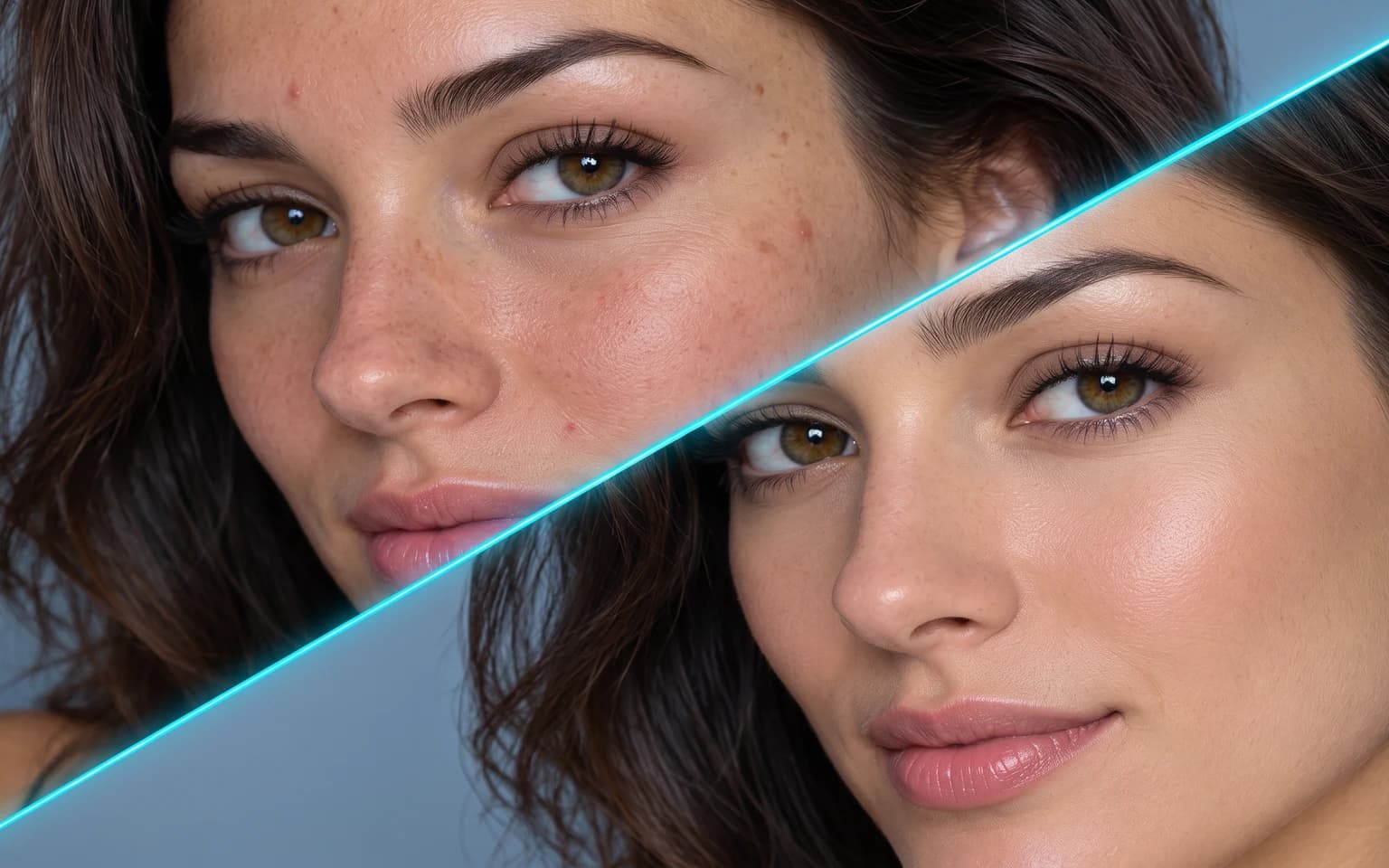
AI Photo Retouching gives portraits the light touch a careful editor would: calmer skin, less shine, softer shadows and balanced light, with real texture left in place. Freckles, moles and face shape are kept. Only use photos you have the right to edit.

  • Image Upscaler
  • Image Enhancer
  • Unblur Image
  • Denoise Image
  • Photo Retouching
  • Face Swap
  • Camera Angle Changer
  • Image Relight
  • Background Changer
  • Watermark Remover
  • Object Remover
  • All Tools
Photo Retouching
Why use it

Retouching that does not look retouched

Calmer skin

Temporary blemishes, redness and shine are reduced, the kind of thing that will be gone next week anyway. A passing breakout, a shaving rash or a flush after exercise is toned down rather than painted over.

Try it now

Real texture kept

Skin keeps its pores and natural texture instead of the smoothed, plastic look of a beauty filter. Up close, the skin should still look like skin, with the small variations that make a portrait believable.

Try it now

No reshaping

Faces and bodies are not slimmed or changed. Jawlines, noses, eyes and waistlines keep their real proportions, and age and expression are left as they are.

Try it now

Clothing and background untouched

AI Photo Retouching works on the face and skin, not the whole frame. Clothing, hair styling, background and composition are kept, so a retouched shot can sit in an album or gallery next to untouched frames without standing out.

Try it now
Capabilities

Touch-ups AI Photo Retouching can handle

Even skin tone

Balance blotchy or uneven color across the forehead, cheeks and neck so the face reads as one consistent tone.

Reduce shine

Tone down oily highlights on forehead and nose, the usual side effect of flash or warm studio lights.

Soften harsh shadows

Ease hard light under eyes and chin that comes from overhead sun or a single ceiling lamp.

Stray hair and small marks

Tidy small distractions you point out in the details box, such as flyaway hairs, lint on a collar or a stray eyelash.

Tired-looking eyes

Lighten dark circles slightly while leaving the natural creases that belong to the person and their age.

Glare on glasses

Calm lens reflections when you ask for it, though eyes hidden completely behind glare may need to be partly reconstructed.

For polished portraits you may edit
Who it is for

For polished portraits you may edit

Professionals

Tidy up your own headshot for work profiles, where a neat but honest look matters more than perfection and the photo should still match you at an interview.

Portrait photographers

Speed up light retouching on client sessions, leaving more time for the frames that need careful manual work.

Social media creators

Polish selfies while keeping a natural look that still matches how you appear in person.

Couples and families

Freshen up portraits for invitations and albums that will be printed and kept for years, where every detail is seen at close range.

Models

Models behind this tool

  • OpenAI logoGPT-Image-2.5OpenAI
  • OpenAI logoGPT-Image-2OpenAI
  • ByteDance logoSeedream 5.0 ProByteDance
  • ByteDance logoSeedream 5.0ByteDance
  • ByteDance logoSeedream 4.5ByteDance
  • Google logoNano Banana ProGoogle
  • Google logoNano Banana 2Google
  • Google logoNano BananaGoogle
  • Alibaba logoQwen Image 3.0 ProAlibaba
  • Alibaba logoQwen Image 3.0Alibaba
  • Black Forest Labs logoFlux 2Black Forest Labs
  • Black Forest Labs logoFlux KontextBlack Forest Labs
  • Midjourney logoMidjourneyMidjourney
  • MiniMax logoMiniMax Image 01MiniMax
  • Alibaba logoWan 2.6 ImageAlibaba
  • Alibaba logoWan 2.5 ImageAlibaba
  • xAI logoGrok ImagexAI
How it works

Polish a portrait with AI Photo Retouching

Try it now
01

Upload your photo

Add a photo you have the right to edit.

02

Add details if you like

Optionally list specific fixes, or leave the box empty.

03

Generate and download

Start the task and download the retouched photo.

Tips & FAQ

Get better results

Tips

01

Name specific fixes in the details box, such as a stray hair or glare on glasses. One clear request usually works better than a long list.

02

Moles, scars and freckles are kept unless you ask otherwise.

03

Only upload photos of yourself or of people who agreed to it.

04

Start from a sharp photo; if the face itself is soft or grainy, run Face Enhancer or Denoise Image first.

05

Ask for less rather than more; a subtle pass that still shows skin texture holds up better in print and over time than a heavily smoothed one.

Frequently Asked Questions

No. Retouching is limited to skin, light and small blemishes; face shape, body shape and features are kept, so the person still looks like themselves. If you notice any change in proportions, try another model rather than accepting it, since reshaping is outside what this tool is meant to do.

No, they are kept by default because they are part of how someone looks. If you want a particular mark or a stray hair cleaned up, name it in the details box. Removing a permanent feature is a bigger decision than easing a temporary spot, so it is left to you.

Only if you have that person’s permission to edit their photo.

Ask what is wrong with the portrait. If the face is already in focus but shows shine, temporary blemishes, uneven tone or harsh light, retouch it here. If the face is blurry, noisy or too small to show clear eyes and hair, Face Enhancer is the right choice, because it recovers clarity and deliberately leaves skin alone. For a portrait with both problems, enhance first and retouch second.

It does not reshape features, change an expression, swap clothing or relight the whole scene. Permanent marks such as scars and tattoos stay unless you name them, and a face that is out of focus stays soft, because recovering clarity is a different job. A strong color cast across the whole photo is also better handled by a general color edit.

It uses pay-as-you-go credits. The price is shown next to the Generate button before you start.

You can explore the page without signing in. Sign in when you are ready to generate.

More tools

  • Text to Image
  • Image to Image
  • Image Upscaler
  • Image Enhancer
  • Photo Restoration
  • Unblur Image
  • Image Sharpener
  • Denoise Image
  • Face Enhancer
  • Unpixelate Image
  • Face Swap
  • Head Swap
  • Colorize Photo
  • Camera Angle Changer
  • Image Relight
  • Change Color of Image
  • Face Editor
  • Edit Text in Image
  • Image Translator
  • Background Changer
  • Background Remover
  • Image Layer Decomposition
  • White Background
  • Blur Background
  • Change Background Color
  • Product Staging
  • Product Beautifier
  • Flat Lay Generator
  • Ghost Mannequin
  • Product Photo Generator
  • Clone Product Image
  • Watermark Remover
  • Object Remover
  • Remove Text from Image
  • People Remover
  • Photo to Anime
  • Photo to Sketch
  • Photo to Cartoon
  • Photo to Painting
  • AI Filter
  • Vintage Filter
  • Black and White Filter
  • Glitch Effect
  • Photo to 3D Cartoon
  • Cartoon Avatar Maker

Give a portrait a natural polish with AI Photo Retouching

Upload a photo you are allowed to edit above.

Try it now
  • Image Upscaler
  • Image Enhancer
  • Unblur Image
  • Denoise Image
  • Photo Retouching
  • Face Swap
  • Camera Angle Changer
  • Image Relight
  • Background Changer
  • Watermark Remover
  • Object Remover
  • All Tools