
No. It keeps the person recognizable and does not swap or replace faces. Requests to turn someone into a different person or to paste in another face are outside what it is designed for. Use it only on photos you have the right to edit.


The AI Face Editor handles the small fixes that spoil an otherwise good portrait, such as adding a smile, opening eyes that blinked or trying a new hairstyle, hair color or glasses. Describe the change in a few words and the person stays recognizably the same. Only edit photos you have the right to edit.
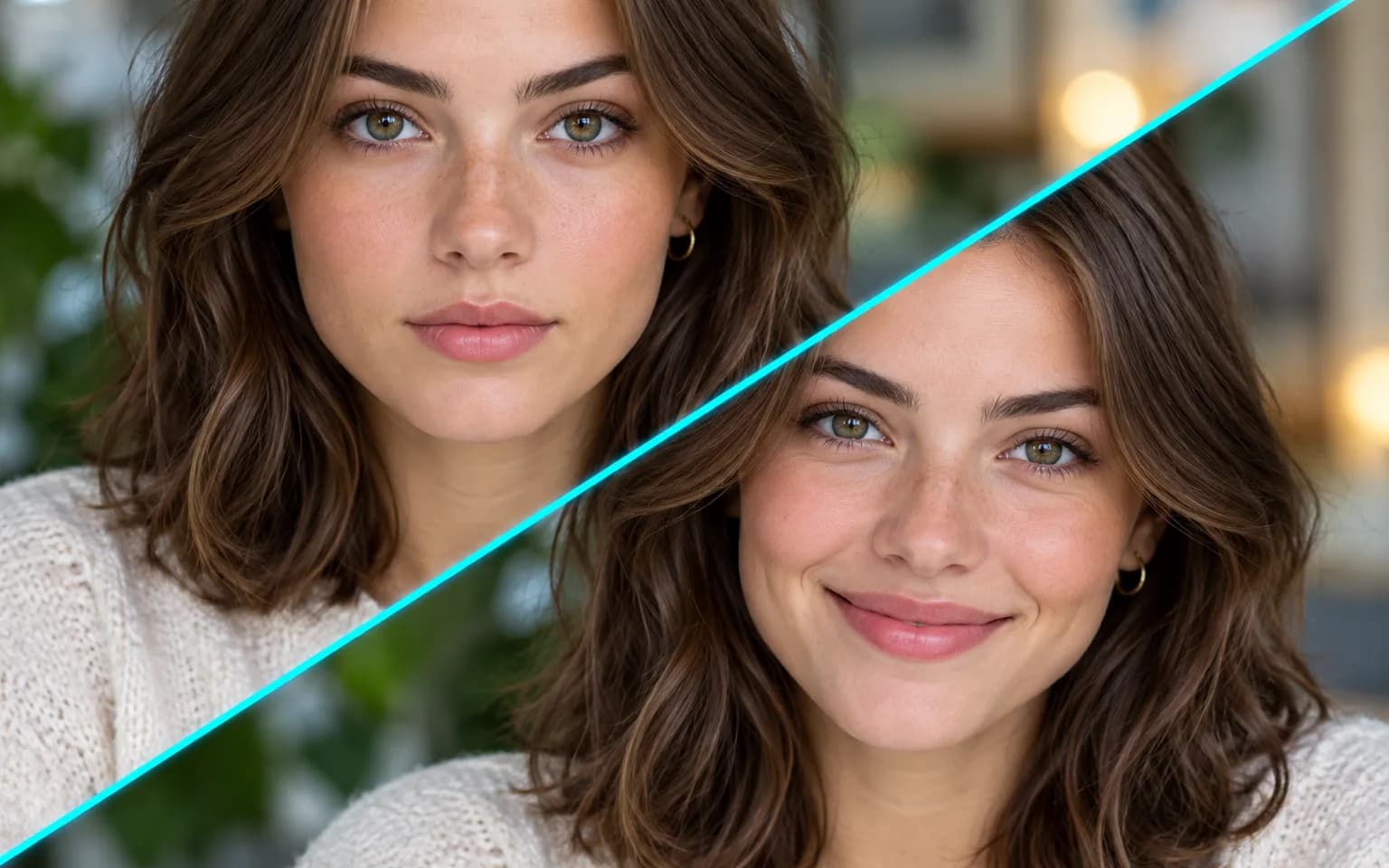
Add a smile, open closed eyes or soften a frown without retaking the photo. The change is kept local to the face, so the pose, the clothing and the people around the subject stay as they were.
Try it nowTry a new hairstyle, a different hair color or a pair of glasses before committing in real life. Length, texture, parting and frame shape can all be named, such as a chin-length bob or thin round metal frames.
Try it nowFace shape, age and distinctive features stay; the face is never swapped or replaced. Skin tone, moles and scars are part of what makes someone recognizable, so they are kept unless they are covered by the change you asked for.
Try it nowThe AI Face Editor is built for one described change, not a makeover. It does not slim faces, enlarge eyes or smooth skin into a filtered look, which keeps the edited portrait close to how the person actually appears.
Try it nowOpen eyes that blinked at exactly the wrong moment, matching the eye color visible elsewhere when possible.
Turn a stiff, neutral look into a gentle smile, with or without visible teeth.
See a different length or style before you book the salon, from a short crop to loose waves.
Add or remove glasses in a portrait, or swap bold frames for a lighter style.
Preview copper, ash blonde or grey before dyeing, keeping the current cut and parting.
Have the subject look toward the camera when their eyes wandered off to the side; the eyes move, but the head keeps its pose.
Fix the one group photo where someone blinked, with the agreement of the person being edited.
Adjust your own headshot expression so it looks approachable rather than tense before it goes on a company website or a professional profile.
Make small client-approved expression fixes without scheduling a reshoot, and keep the untouched original in the client file.
Try hair looks on your own photos before deciding what to change in real life.
 GPT-Image-2.5OpenAIGPT-Image-2OpenAI
 Seedream 5.0 ProByteDanceSeedream 5.0ByteDanceSeedream 4.5ByteDance
 Nano Banana ProGoogleNano Banana 2GoogleNano BananaGoogle
 Qwen Image 3.0 ProAlibabaQwen Image 3.0Alibaba
 Flux 2Black Forest LabsFlux KontextBlack Forest Labs
 MidjourneyMidjourney
 MiniMax Image 01MiniMaxWan 2.6 ImageAlibabaWan 2.5 ImageAlibaba
 Grok ImagexAI
Add a photo you have the right to edit.
Describe the change, such as a smile or shorter hair, and name the person if there are several faces.
Start the task, check the eyes, teeth and hairline, then download the edited photo.
Describe one change at a time for the most faithful result.
Name the person when the photo has several faces.
Only edit photos of yourself or of people who agreed to it, and never to mislead others about what someone did or said.
Faces that are small, turned sideways or partly covered give the model less to work with; crop closer or pick a frontal shot for cleaner edits.
Zoom in on eyes, teeth and the hairline afterwards, because those areas are generated and are where small mistakes show first.
No. It keeps the person recognizable and does not swap or replace faces. Requests to turn someone into a different person or to paste in another face are outside what it is designed for. Use it only on photos you have the right to edit.
It adds a natural, gentle smile, the fix people ask for most often. Describe anything else you want instead, ideally one change at a time. When a second change is needed, run the edited result through the AI Face Editor again rather than packing both requests into one description.
Pick by the problem. Use this editor when the content of the face is wrong, such as closed eyes, a missing smile or the hair you want to preview. Face Enhancer is for a blurry or noisy face that needs clearer detail without changing the expression, and Photo Retouching is for blemishes, shine and uneven skin tone.
Opened eyes and new smiles are generated, not recovered, so the shape of the eyes or teeth may differ slightly from the real person. Very small faces, strong side profiles and faces behind hands or hair are harder to edit cleanly. The tool also does not change age, body shape or face shape.
Yes, if the photo is of you or you have permission. Keep edits modest, such as a softer expression or tidier hair, so the picture still represents the person honestly.
It uses pay-as-you-go credits. The price is shown next to the Generate button before you start.
You can explore the page without signing in. Sign in when you are ready to generate.
Upload a photo you are allowed to edit above and describe the one change you want.
Try it now