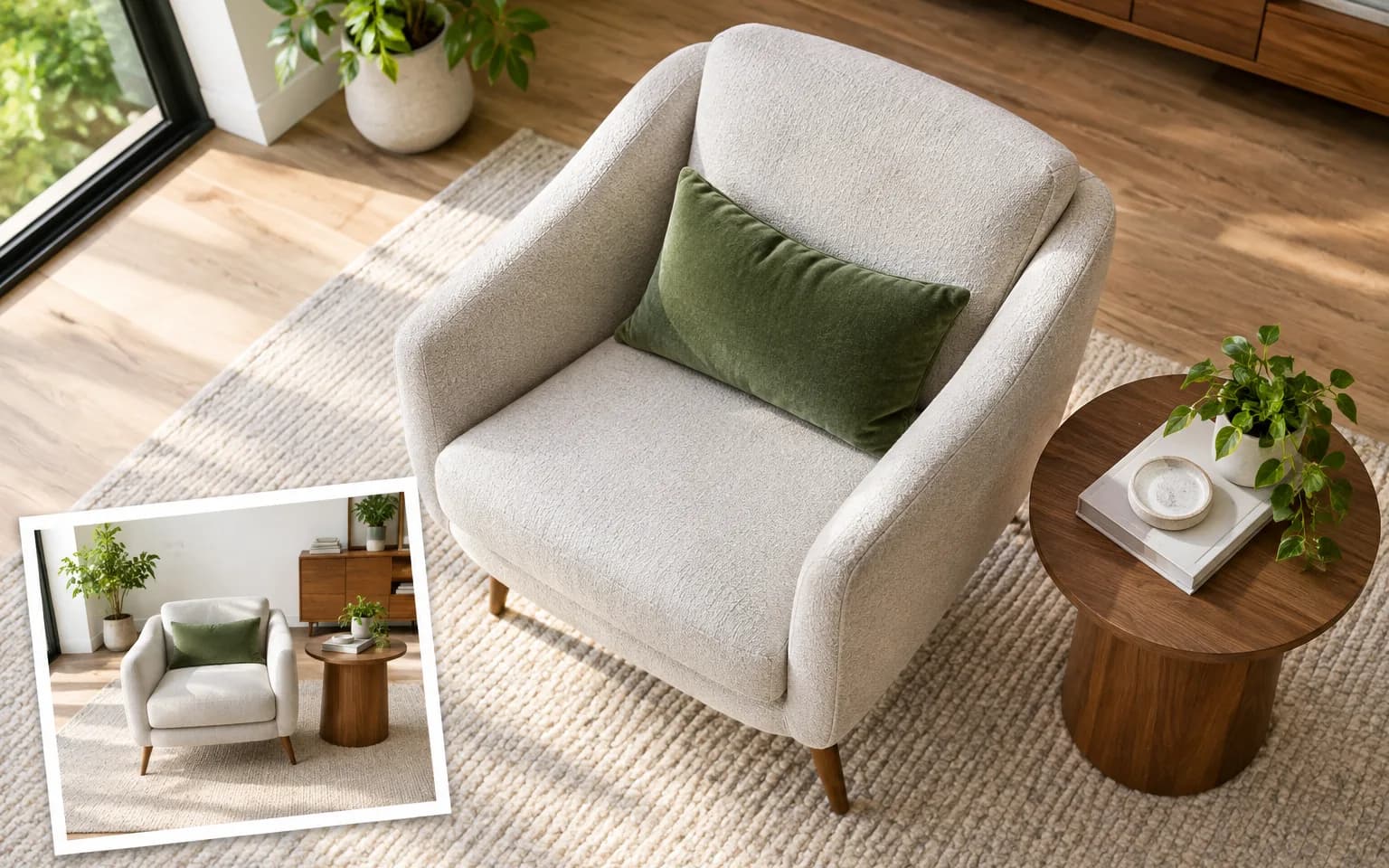

It is a realistic reconstruction rather than a measured one. Areas hidden in the original, such as the back of a box or the far side of a chair, are generated, so review labels and other details that matter.


Use AI Camera Angle Changer to see the scene in your picture from a different camera position, whether that is higher, lower or off to one side. Objects, colors and lighting are kept, and only the perspective moves. It works from one ordinary photo, with no depth scan, extra shots or camera data needed.
Ask for a top-down, low-angle, side or three-quarter view in plain words, the way you would brief a photographer. You can also say how far to move, such as a slight step to the left or a camera raised just above head height.
Try it nowObjects, colors and lighting are kept; only the perspective changes, so the new frame still belongs to the same shoot. People are not added or removed, and clothing, props and the surrounding room stay consistent with the original.
Try it nowWithout a description you get a slightly higher three-quarter view. It is a common product and interior angle that reveals a little more of the top and side than a straight-on shot.
Try it nowAI Camera Angle Changer infers depth from a single flat image, then draws the scene as it would plausibly look from the new position. That makes it fast and flexible, but anything the original camera never saw has to be invented rather than measured.
Try it nowShow a product from another side when a listing needs one more view, keeping its color and finish.
Turn an eye-level table shot into an overhead flat lay for menus, recipes and product sets.
Make a subject look bolder and taller by shooting it from below, which suits products, statues and buildings more than close portraits.
Preview an interior from another corner of the room; AI Camera Angle Changer keeps the furniture and finishes you already have.
Bring a product snapped from above down to a calmer eye-level view with less distortion.
Turn a flat front-on portrait slightly to one side for a more dimensional composition; the side of the face that was hidden is generated, so check the likeness.
Add extra product views without a new shoot, and review any printed text on sides the original did not show.
Explore different perspectives of a room or lobby for a listing, labeled as a visualization where rules require it.
Get the composition a layout needs without asking for a reshoot, such as more headroom for a headline.
Sketch alternative shots of a scene quickly, from establishing views to close, low coverage.
 GPT-Image-2.5OpenAIGPT-Image-2OpenAI
 Seedream 5.0 ProByteDanceSeedream 5.0ByteDanceSeedream 4.5ByteDance
 Nano Banana ProGoogleNano Banana 2GoogleNano BananaGoogle
 Qwen Image 3.0 ProAlibabaQwen Image 3.0Alibaba
 Flux 2Black Forest LabsFlux KontextBlack Forest Labs
 MidjourneyMidjourney
 MiniMax Image 01MiniMaxWan 2.6 ImageAlibabaWan 2.5 ImageAlibaba
 Grok ImagexAI
Add the photo whose viewpoint you want to change, with the whole subject visible.
Say where the camera should be, or leave it empty for the default view.
Start the task, check hidden sides and straight lines, then download the new view.
Describe the viewpoint plainly, for example from directly above or from the left side at eye level.
Parts not visible in the original are filled in plausibly, so check details such as labels and backs of products.
Small angle changes give the most faithful results.
Start from a sharp photo with the whole subject in frame; edges cut off by the original crop cannot be recovered reliably.
Watch straight lines such as door frames, shelves and table edges, which can bend slightly when the perspective shifts a lot.
It is a realistic reconstruction rather than a measured one. Areas hidden in the original, such as the back of a box or the far side of a chair, are generated, so review labels and other details that matter.
Top-down, low-angle, side, three-quarter and eye-level views all work. Describe where the camera should sit relative to the subject; modest moves are usually more faithful than a full turn to the opposite side.
Change the angle when the subject is seen from the wrong place, for example too far above or straight on. Image Relight keeps the camera where it was and moves the light instead, so use it when the framing works but shadows or mood do not. Because this tool keeps the original lighting, you can relight the new view afterwards if both need changing.
Not reliably. Each run creates one new view independently, so a set of angles made from the same photo may disagree on details such as seams, labels or the exact shape of the back. For a complete turnaround or accurate spin view, photograph the real object from each side.
You get a slightly higher three-quarter view of the same scene. It is a safe first try for products and rooms; once you see how AI Camera Angle Changer reads your photo, describe a more specific position and run it again.
It uses pay-as-you-go credits. The price is shown next to the Generate button before you start.
You can explore the page without signing in. Sign in when you are ready to generate.
Upload a photo above and describe the viewpoint you want, such as slightly higher or from the left.
Try it now