Case Studies
Buddy-Inspired Unicorn Mask: From AI Design to a Test Print
Design a flat unicorn mask, inspect the craft guides and prepare a plain-paper fit check.
APIXO Team
Start creating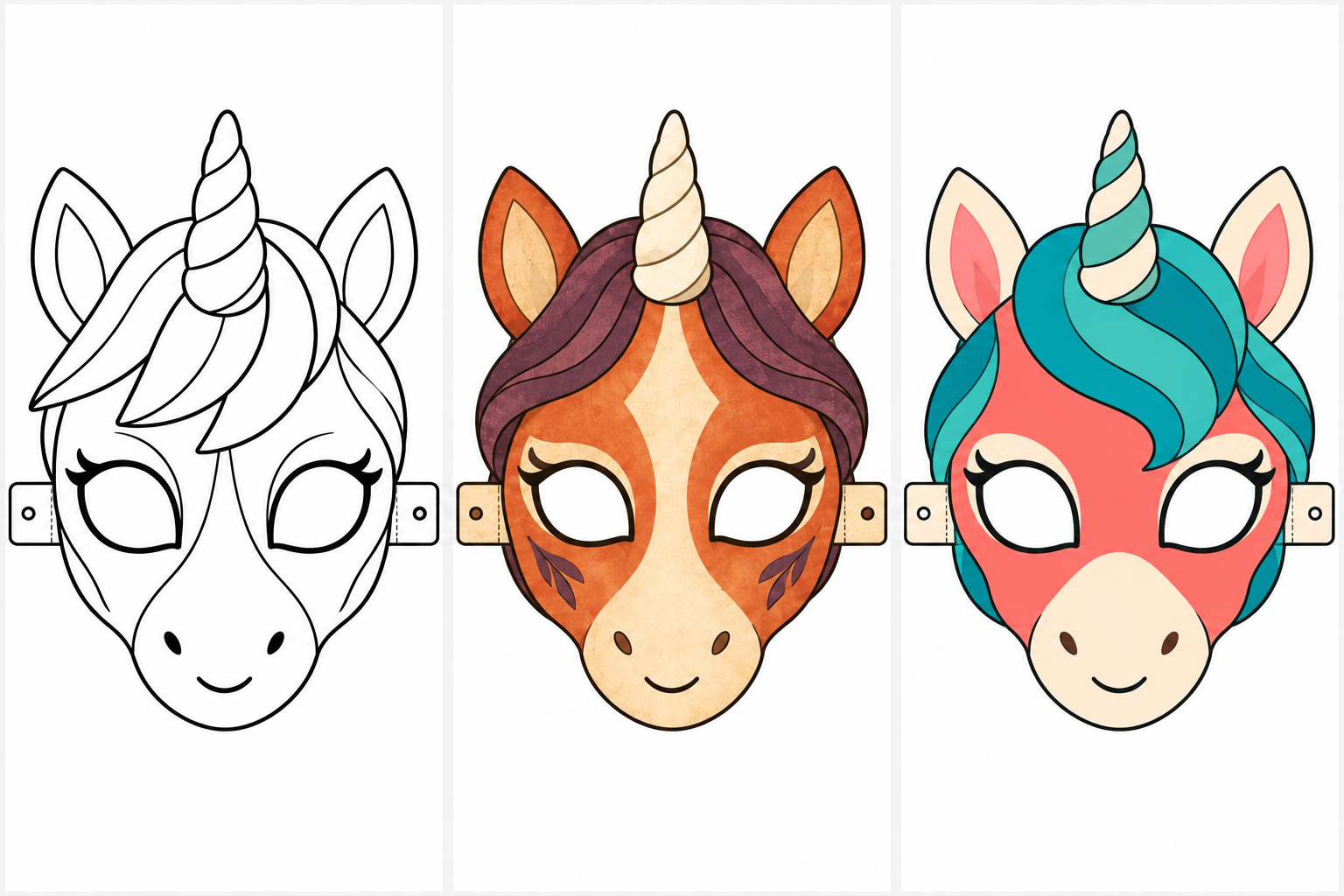


Case Studies
Design a flat unicorn mask, inspect the craft guides and prepare a plain-paper fit check.
A printable unicorn mask starts with a flat, front-facing design, not a dramatic character portrait. Keep the horn and ears inside the page, separate the eye openings from decoration, and test the downloaded image on plain paper before choosing your final craft material.
Create a flat design with the Buddy the Unicorn Mask Generator
Choose a friendly or eerie mood, say who will wear the mask, and specify the paper size: A4 or Letter. Set the physical dimensions when you arrange the image for printing, then check the fit with a plain-paper sample.
Broad shapes make it easier to inspect and personalize a design. Use a simple mane and a few color areas rather than many tiny lines that compete with the eye holes.
Original friendly unicorn paper mask, flat symmetrical front view as BLACK-AND-WHITE COLORING LINE ART on white. One horn, rounded ears and broad blank mane regions for coloring. Two clear separate eye openings, a continuous solid outer cutting outline, side strap tabs with round tie holes and short dashed fold marks only at the tab hinges. Generous white margins around every part. No prefilled colors, gray shading, perspective, cast shadows, background, text or logos. Keep decorative lines away from the eye openings.
Let the color and expression carry the eerie mood. Heavy scratch textures can hide the craft lines, so keep wear inside broad color areas and keep the outline crisp.
Flat symmetrical paper-mask concept for an original weathered unicorn theater mascot. Faded rust-orange face, muted plum mane, one cream horn and a small fixed smile. White page, fully visible outline, simple eye openings and clean solid cut line. Restrained worn-paper texture inside colored regions only. No teeth crossing the eye holes, no background, no writing.
Change the palette when the mask needs to match clothing you already own. Keep the silhouette and guide arrangement simple while comparing colors; redesigning both at once makes a paper test harder to evaluate.
Front-facing flat original unicorn paper-mask artwork on white. Coral face, teal ribbon-like mane shapes, cream ears and a single short striped horn. Broad clean color regions, distinct eye openings and one clear outer cut line. Complete ears and horn within generous page margins. No shadows, three-dimensional perspective, labels or logos.
If the eyes do not line up, adjust the spacing or the mask outline in an editor rather than stretching the whole image until the horn becomes distorted. If the horn clips at the page edge, reduce the layout scale or move the artwork inside the print margins. Save each revision so the next print uses the intended version.
It creates a flat raster image for your paper-layout workflow. This guide uses that image for a printed craft mask.
It sets the design direction. Set dimensions in the printing workflow, then check the actual paper sample on the intended wearer.
Redraw ambiguous guides in an editor or regenerate the design. Check the cleaned version on paper before cutting the final material.
Change the horn pattern, mane shape, palette and expression. Keep those character decisions separate from the physical fit checks.
Develop a distinctive mascot with the character-design guide
Plan the outfit to go with your mask in the AI Halloween Costume Generator.
Find related costume and portrait tools in the Halloween AI collection
Build with APIXO
Explore image, video, and audio models in one place.