
Guides
Seedream 5.5 Highlights: Multi-Round Editing, Transparency, and Layers
Explore Seedream 5.5: three core strengths, two feature upgrades, up to 100 layers and 4K resolution, with official examples and creative uses.
APIXO Team

AI concept illustration: subjects, decorations, and backgrounds as assets for subsequent designs.
Seedream 5.5 focuses on three core strengths and two major feature upgrades: more stable editing across multiple rounds, improved image quality and multilingual text, plus transparent image generation and layer separation. Custom dimensions also support 4K resolution. The official examples below explain what these changes mean for creators.
This guide uses official images and three demonstration videos to explain what to look for and how to apply editing, transparency, and layer reuse to your own designs.
New to the model? Start with our Seedream 5.5 overview and use cases to explore its role in a product campaign.
What Is Seedream 5.5, and What Are Its Key Features?
Seedream 5.5 is an image generation and editing model. It creates images from text and revises existing images. Its highlights fall into three core strengths and two feature upgrades.
Three core strengths
- Precise editing across multiple rounds: change the requested region while preserving the subject and non-target areas.
- Realism, reference blending, and clarity: more natural expressions, materials, proportions, and lighting, with sharper details.
- Small and multilingual text: improved rendering of small type, dense information, and copy in different languages.
Two major feature upgrades
- Transparent image generation and editing: transparent and semi-transparent assets that reduce cutout work.
- Layer separation and subsequent text editing: up to 100 layers, with text recognition data for further work in editing tools.
Output resolution: custom dimensions support up to approximately 8.29 megapixels, including 4K at 16:9.
How Does Seedream 5.5 Improve Editing and Image Quality?
1. Precise Editing and Consistency Across Rounds
Seedream 5.5 can edit selected regions or elements while preserving the subject and non-target areas across successive revisions. It also emphasizes stable image quality through multiple edits. This helps creators refine an approved image without repeatedly rebuilding details that were already accepted.
Read the instruction on the right, then inspect the corresponding area on the left. The demonstration moves through clothing categories and is labeled as 85 editing rounds. Watch the face, pose, hair, storefront, and lighting, rather than only the new garment. For your own work, specify both what to change and what to preserve, with one clear goal per round.
For example, a fragrance campaign could keep the bottle and composition while revising the background, cap material, and lighting separately.
2. Improved Realism, More Natural Multi-Image Blending, and Sharper Images
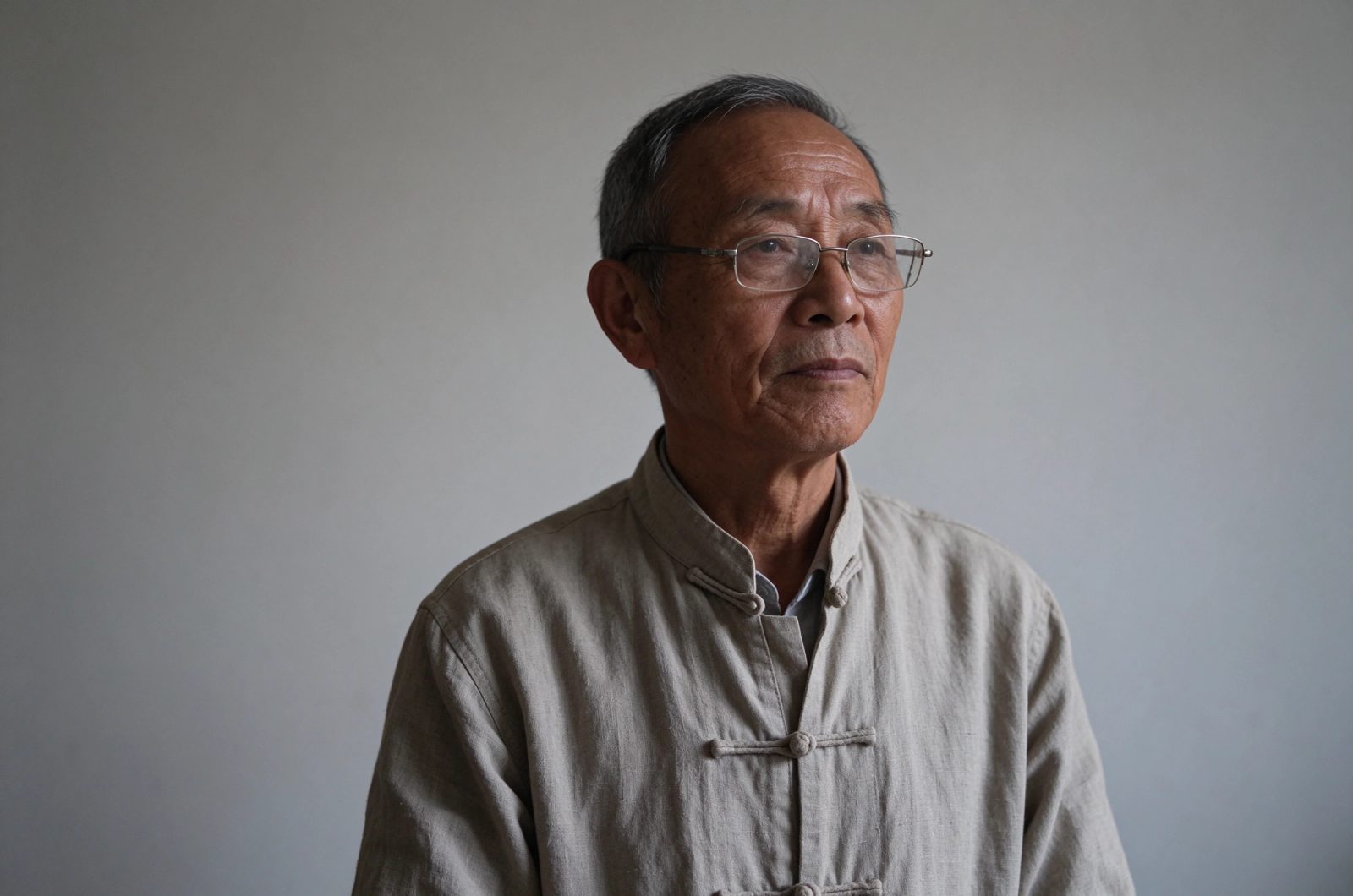
The improvements cover facial expressions and proportions, product materials, and scene lighting. When combining references, consistent scale, perspective, and illumination help subjects belong in the scene. The portrait below illustrates skin texture, glasses, and fabric under soft side lighting.
From one reference to a consistent character sheet
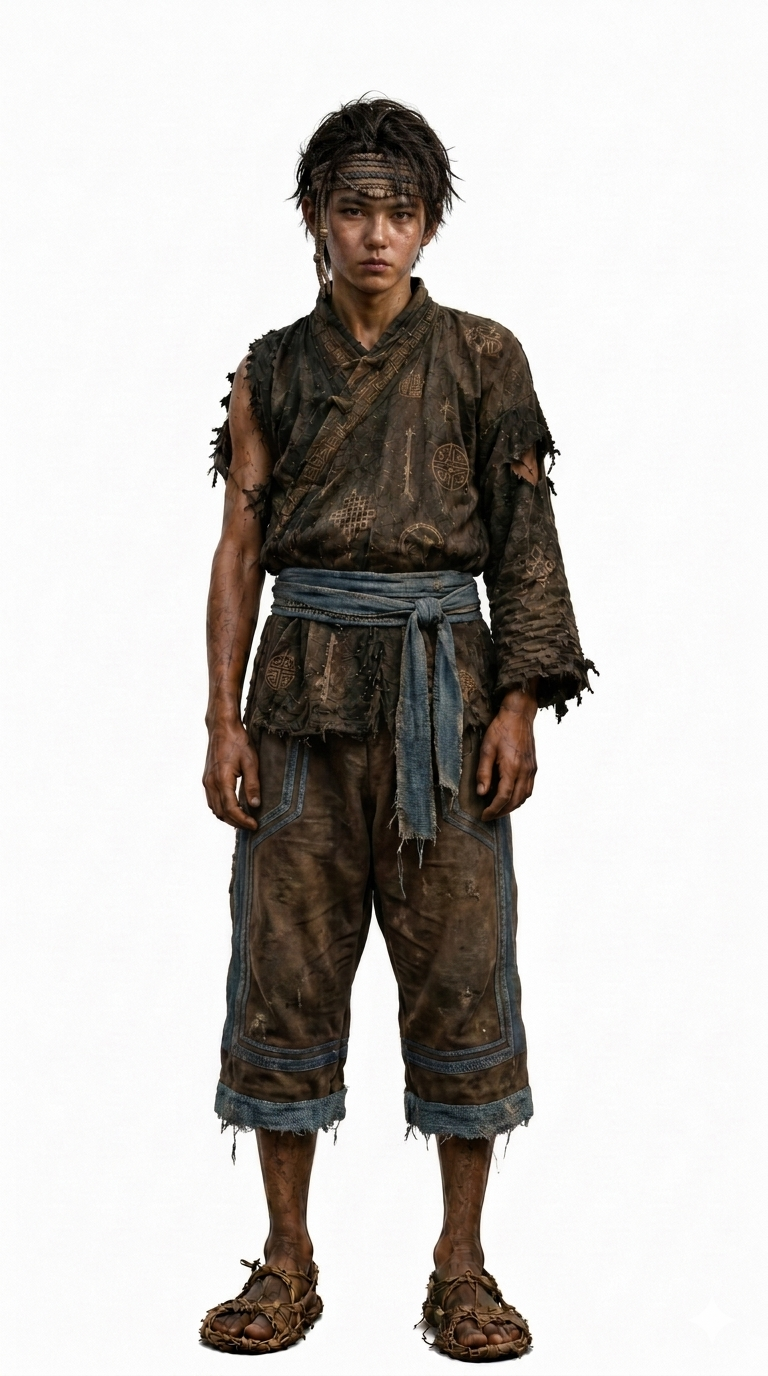
The official example starts with one character reference and generates a facial close-up alongside front, profile, and back views. Compare the face, headband, belt, clothing patterns, and body proportions across angles. This demonstrates the example's cross-view identity; it is separate from consistency across successive editing rounds.
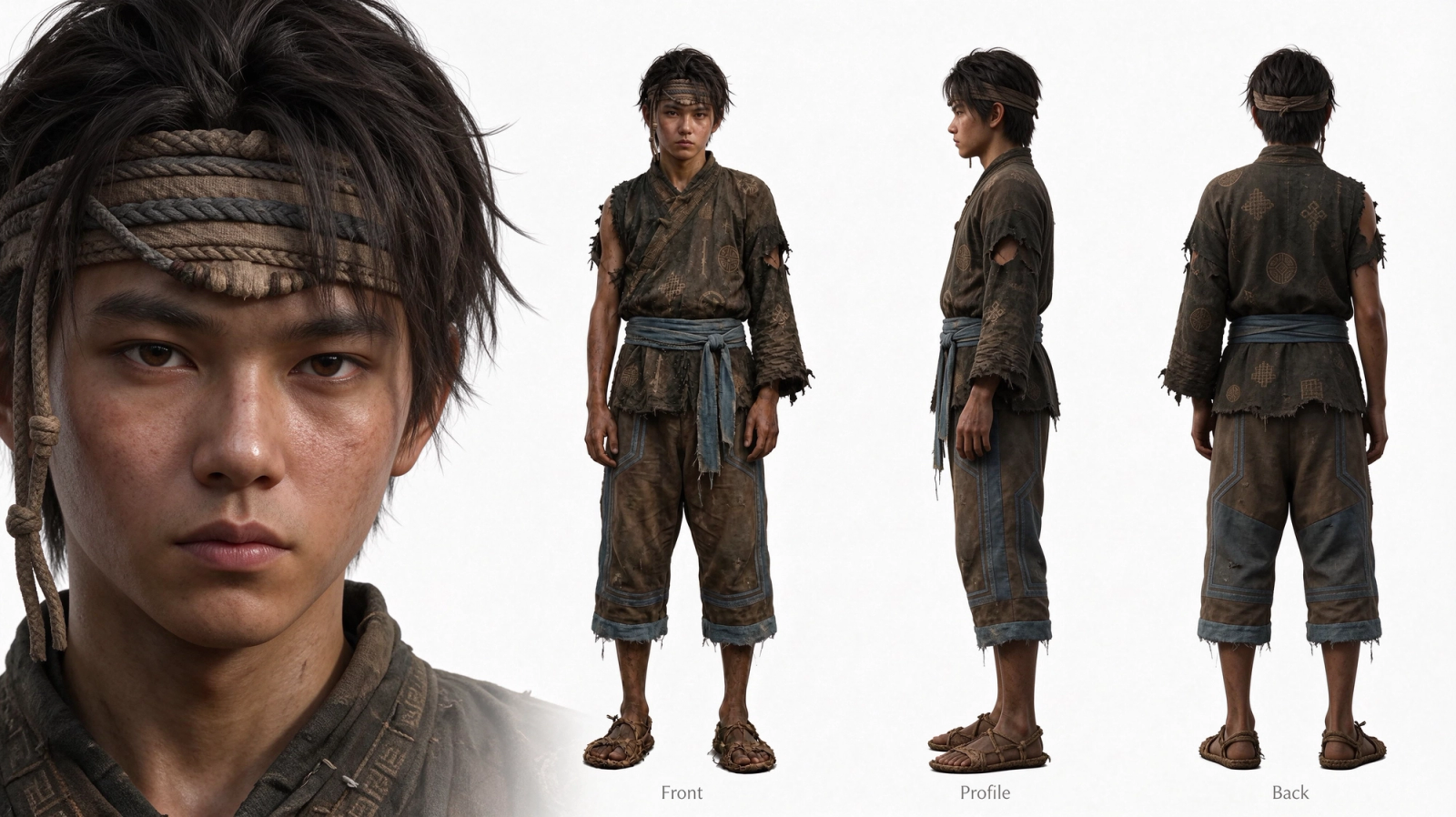
Seedream 5.5 also improves clarity at the same pixel dimensions. Better-rendered detail and higher output resolution are different improvements: one affects how the image looks, the other how many pixels it contains.
3. Small Text and Multilingual Rendering
Labels, posters, and information-rich layouts need readable small text as well as strong headlines. Seedream 5.5 targets text accuracy, readability, and layout across languages. All four official examples are included here.
Russian: handwritten plans and task notes

The notebook and sticky notes combine Cyrillic handwriting, dates, times, and task lists. They illustrate small text spread across several information blocks.
Thai: prices and detailed promotional copy

The coworking poster combines three packages, prices, services, and contact information. It shows Thai letterforms and their vowel and tone marks within a dense promotional layout.
Japanese: event information at different text sizes
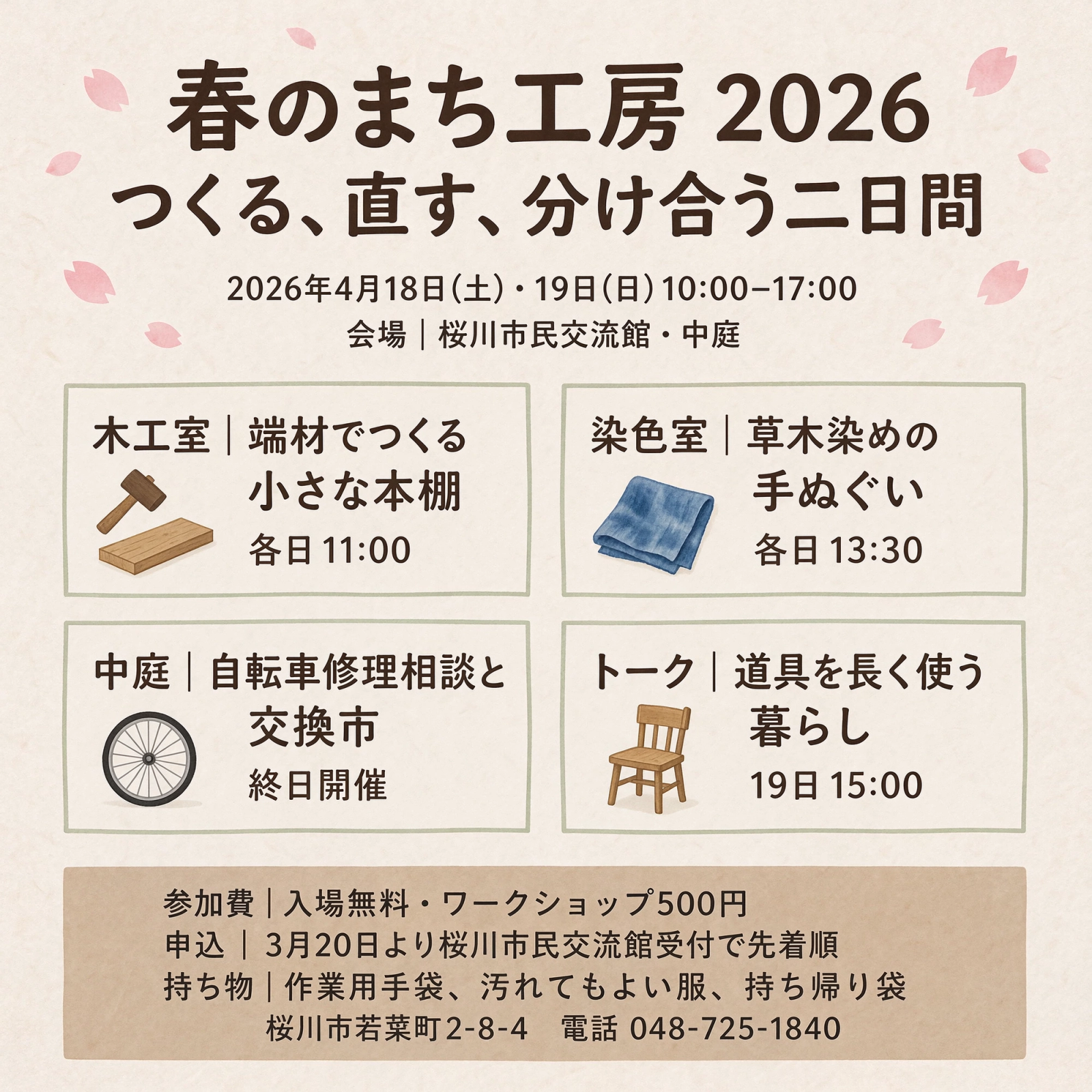
The craft-event poster combines a headline, dates, four activity panels, and smaller supporting details. Its layout separates the main message from schedules and fees.
Filipino (Tagalog): wayfinding within a scene
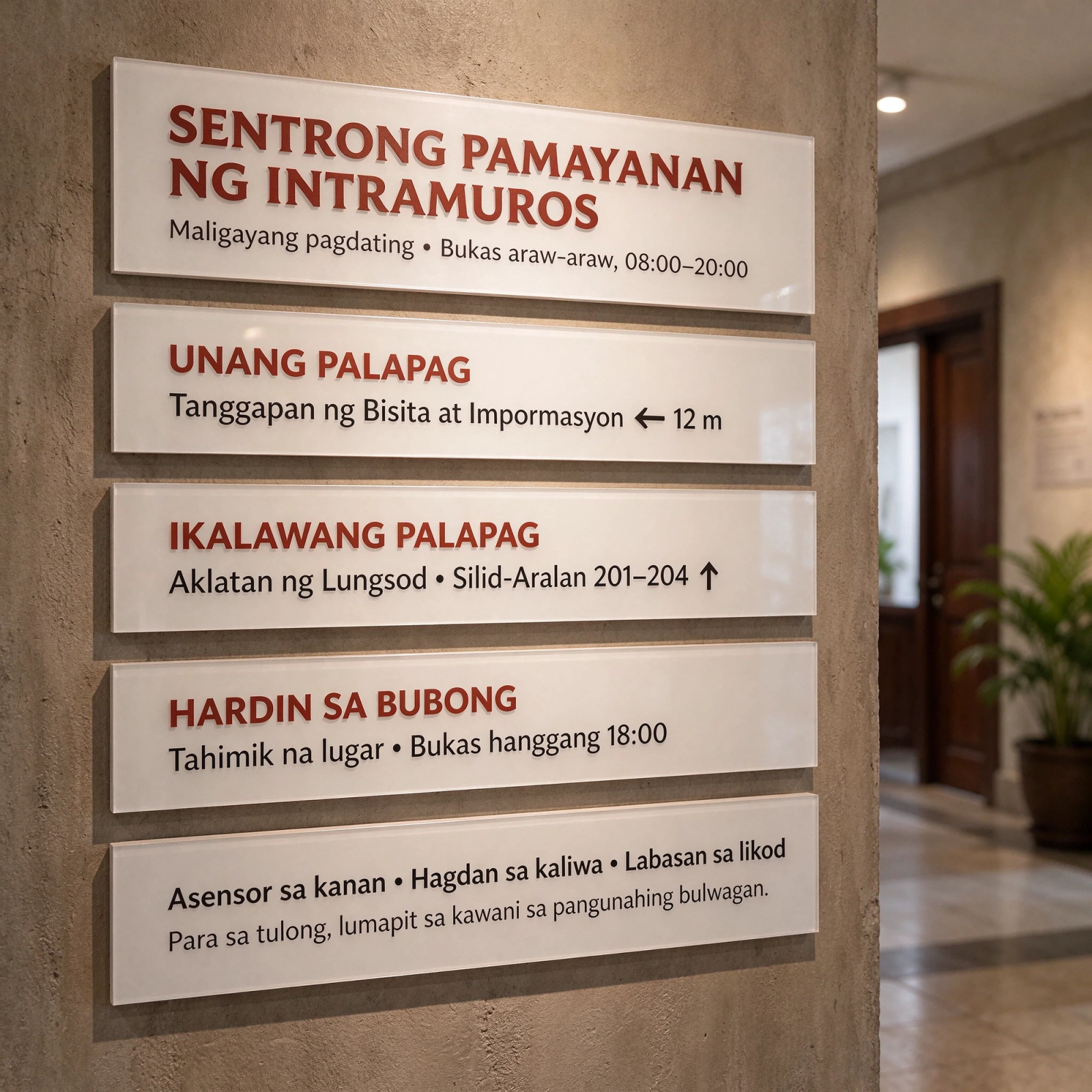
The community-center signs include floors, directions, room numbers, and opening hours. Text must remain readable while fitting the perspective and lighting of the wall.
How Can You Use Transparency and Layer Separation?
4. Transparent Image Generation and Editing
Text-to-image and image-to-image generation support transparent and semi-transparent backgrounds. Products, people, lighting effects, and decorative elements can be placed into new compositions, reducing cutout and edge-cleanup work. Soft glow and translucent edges are especially useful for compositing; check them against both light and dark backgrounds before reuse.
Watch the card edges, glass areas, and decorations: the photograph remains visible through translucent regions while characters and ornaments retain distinct outlines. Transparency affects compositing edges and light transmission, not just background removal. Before using an asset in a poster or product page, check light, dark, and intended backgrounds for white fringes, leftover color, and unnatural contours.
5. Layer Separation and Subsequent Text Editing
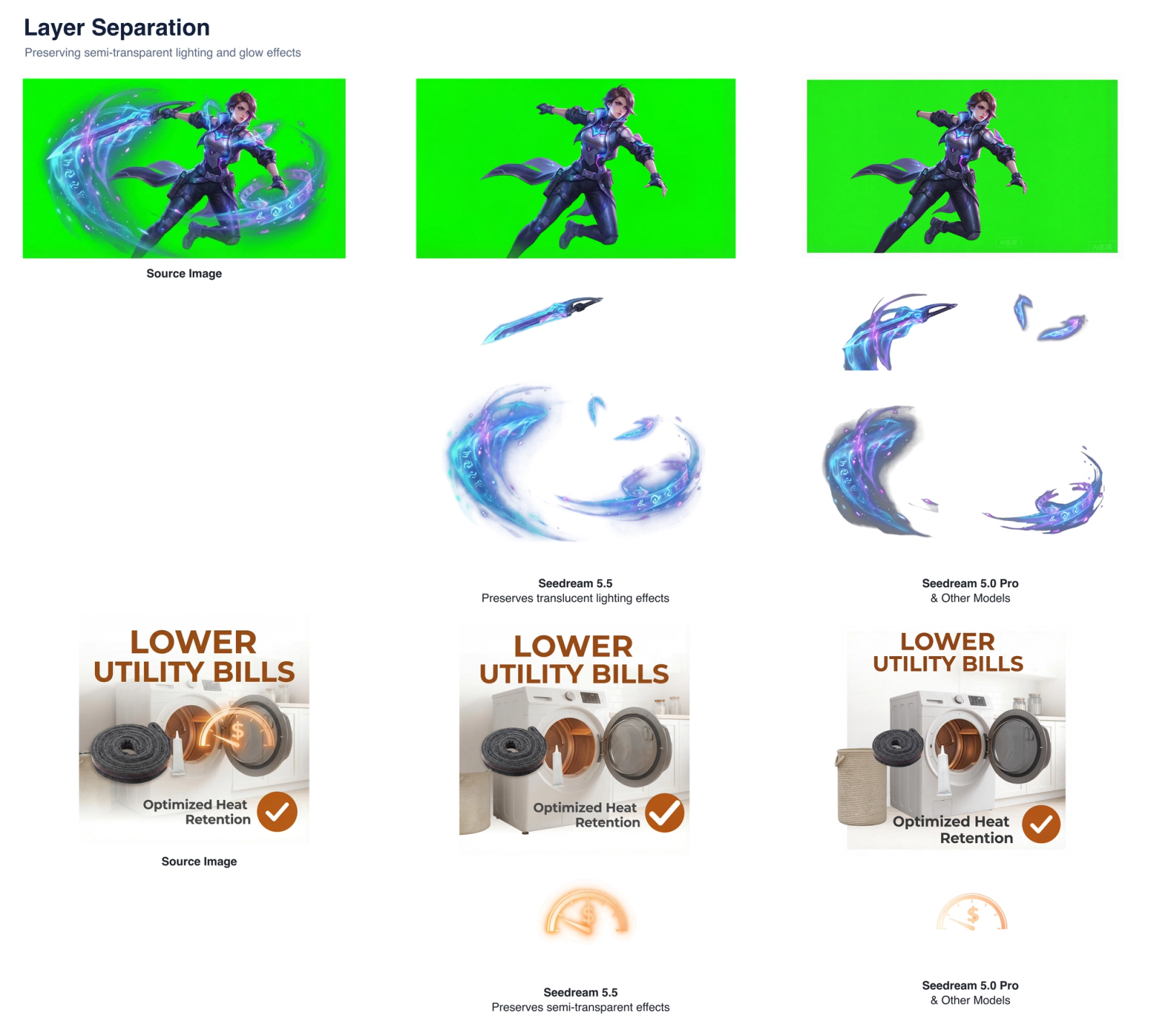
Layer separation turns a finished image into reusable background, subject, decorative, and text assets. It supports up to 100 output layers, text recognition, and extraction of semi-transparent elements.
Compare the original poster with the rearranged version: the drink, headline, hours, and discount badge change position and size independently. The second part shows recognized text and its position, providing information for further editing. This can support adapting a vertical promotion into a banner or preparing dates, prices, and headlines for changes in an editor.
The official comparison below illustrates separated characters, objects, and luminous effects.
Text recognition for further copy changes
With text recognition enabled, regular text layers return PNG images and structured recognition data. Editing tools can use these outputs to update copy, create language versions, and reuse layouts.
Does Seedream 5.5 Support 4K Resolution?
Custom width and height support up to approximately 8.29 megapixels, including 3840 × 2160 pixels at 16:9—commonly known as 4K resolution. The API's 1K, 1.5K, and 2K presets are convenient options, rather than the full resolution limit.
Choose dimensions to fit the intended format and the platform's constraints, then inspect text, materials, and edges at the final display size.
Which Other APIXO Image Models Support 4K?
To create 4K images now, explore the settings and creation options for these models on APIXO:
- GPT Image 2.5 — Offers 1K, 2K, and 4K resolution options.
- FLUX 3 Image — Offers 1K, 2K, and 4K resolution options.
- Nano Banana 2.1 — Offers 1K, 2K, and 4K resolution options.
These are just some of the models that support 4K. Visit the APIXO image generator to explore more image models and try different results with your own subjects, reference images, and aspect ratios.
Which Creative Tasks Benefit?
- Ecommerce and brand design: refine product images, prepare transparent assets, and adapt an approved visual into banners or product layouts. A fragrance campaign is one possible use.
- Multilingual marketing: create posters and notices with localized copy, adapting spacing and hierarchy to each language while keeping the product identity consistent.
- Character and game artwork: use reference consistency and separated assets to develop character sheets and reusable design elements.
How Can You Apply the Seedream 5.5 Demos to Your Own Images?
Start with a clear reference image, then follow these four steps to plan edits, review results, and prepare the final assets.
For a concrete request format, see the overview's product-campaign brief and editing prompt template.
- Prepare a source image and change list. Choose a clear reference and identify the face, logo, text, and composition to preserve. Decide whether the task needs a local edit, transparent assets, or layer reuse.
- Request one specific change at a time. For example: “Replace only the person's coat with a silver long trench coat. Keep the face, pose, hairstyle, other clothing, background, and lighting unchanged.” For a product, substitute the cap material or background color.
- Review each round before continuing. Compare with the last accepted version and zoom in on non-target areas. If the logo, face, or text drifts, return to the previous version and narrow the requested change instead of building on the error.
- Prepare assets for their final use. Check transparent edges and translucency; inspect separated elements, recognized text, and omissions. Rearrange or revise copy in an editor, then review sharpness, spelling, prices, and dates at the delivery size.
Use Seedream 5.5 on APIXO
Seedream 5.5 is available on APIXO now. Open the Seedream 5.5 model page to try transparent PNG output, multi-round editing and layer decomposition in your browser, or integrate it through the API. For 1K text-to-image via the API, the regular price is $0.020 per output image; the Black Friday price is $0.014 (30% off).
In the meantime, use the APIXO image generator to create with currently available models and prepare your reference images and ideas.
Note: This article draws on internal Seedream 5.5 documentation. Body images and videos are official examples; the cover is an AI concept illustration. Creative suggestions are not independent test results. Example outcomes do not guarantee performance on every input; available features depend on the platform.
Build with APIXO
Explore image, video, and audio models in one place.