Guides
Kling 4.0 Keyframes: Plan a Product Reveal with First, Middle and Last Frames
Plan a product reveal with Kling 4.0 keyframes. Choose first, middle and last images, write motion prompts, and troubleshoot broken transitions.
APIXO Team



Guides
Plan a product reveal with Kling 4.0 keyframes. Choose first, middle and last images, write motion prompts, and troubleshoot broken transitions.
APIXO Team
To take a product video from a closed box to a revealed watch, define the opening, progression and ending. This Kling 4.0 keyframe guide uses one product-reveal storyboard to show when two endpoint images are enough, when a middle image helps, and how to describe the motion between them. Explore the Kling 4.0 model page, then prepare your materials with the plan below.
This integration covers more than keyframes. Kling 4.0 supports text-led shots, ordered image milestones, and reference workflows using images, videos, named subjects and voices. Output supports 3–30 seconds at 720p or 1080p.
Use text to explore action and camera placement, keyframes to plan a product shot’s progression, and references when subject appearance or sound needs guidance. Preserving a reference video’s original audio is a different decision from supplying a voice reference.
The product reveal below is a focused way to plan a keyframe shot. It does not represent tests of every mode or establish that every control is available in the browser workspace.
Write one sentence describing what the viewer should understand at the end. “The package opens to reveal the watch” is easier to evaluate than “make an impressive product video.” Let camera movement, lighting and setting support that action.
Kling 4.0 supports 3–30 whole seconds at 720p or 1080p. Give one clear action enough room to unfold before adding unrelated scene changes.
Before gathering assets, write down who appears, which material describes them, and what they do. Character appearance, product details and setting references serve different purposes. Remove images that do not explain a creative decision.
Named subjects can distinguish characters in the shot. Keep names short and distinct, then describe the action around those subjects. Prepare voice and visual references separately. For dialogue, check pronunciation, pacing and its relationship to visible action.
Prepare a closed package, a partly opened lid, and the fully revealed watch. Keep product position, lighting and camera angle compatible. The opening establishes the starting point, the ending defines the destination, and a middle image explains the progression.
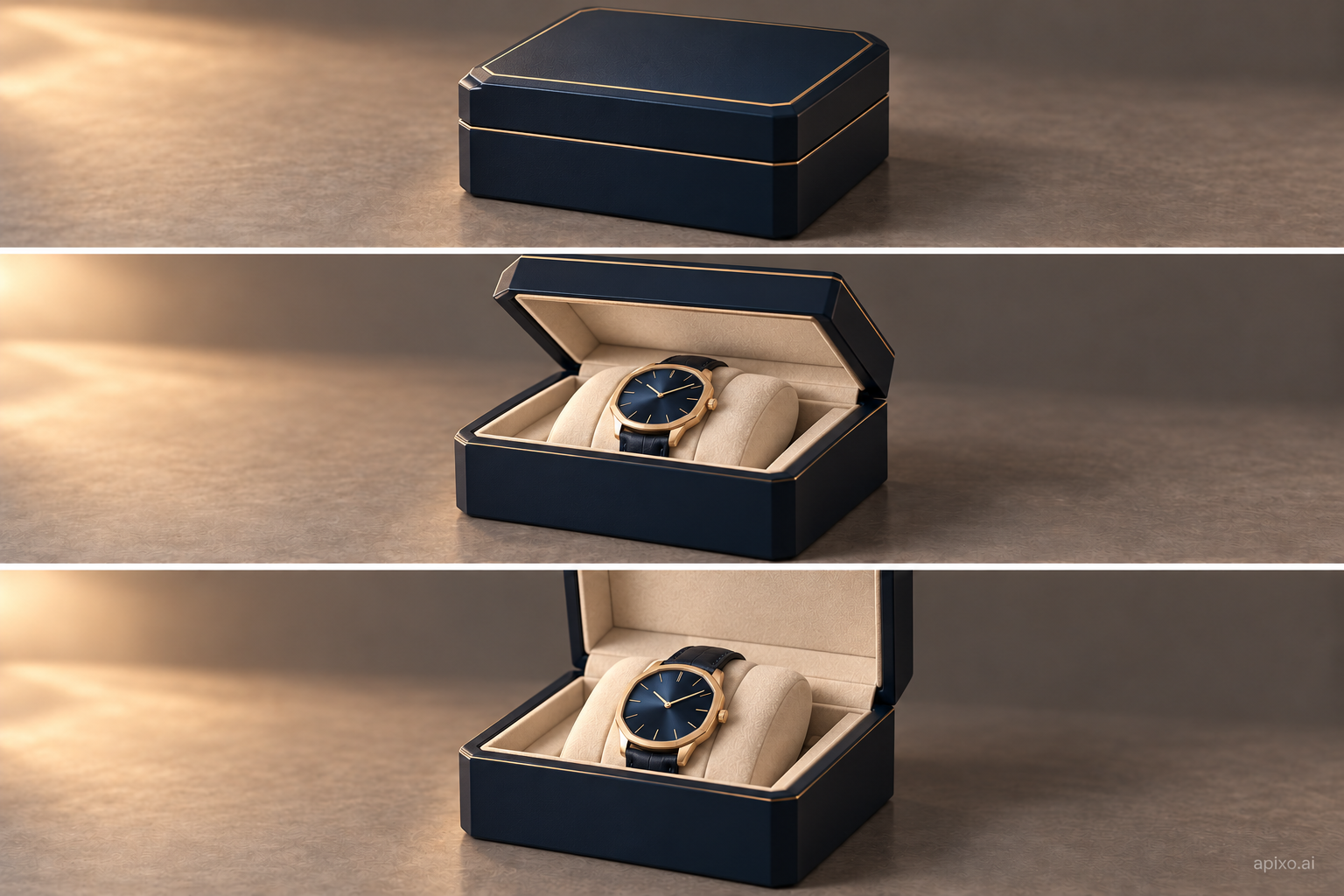
Two endpoints explain closed-to-open, but may leave the lid’s movement ambiguous. Add a middle frame when the half-open pose matters. Avoid padding the sequence with a different box, camera angle or lighting setup.
Middle frames are ordered; they do not have individual timestamps. Use the prompt to describe the movement between compositions:
Keep the camera near table height. Open the lid slowly, reveal the watch, and finish with the face clearly visible. Keep the package centered throughout.
Example note This is an untested creative brief.
If two endpoint images already communicate the action, extra middle frames may add little value.
First, middle and optional last frames together must fit both the ten-frame cap and the limit of output seconds plus one. There can be at most eight middle frames. A three-second clip allows four frames total: two endpoints leave room for two middle frames.
Image-to-video follows the opening image’s aspect ratio. For a vertical clip, prepare a vertical first-frame crop that leaves room for the subject and its movement. Changing an output ratio cannot replace that composition work.
After generation completes, watch the whole clip at normal speed. Inspect the moving lid, physical contact, product reveal and closing composition. Good endpoints do not establish continuity between them. Check product shape, branding and character appearance throughout, and listen separately when audio is present.
Keep the materials, prompt, settings and selected video together. Adjust one major decision at a time: action, framing or references.
If a middle image needs guidance at a specified second, explore Grok Imagine Video 1.5. Its timed keyframes differ from Kling’s ordered storyboard; check the resolution restrictions before choosing.
These are revision directions, not guaranteed fixes. This guide supplies a storyboard and prompt plan; its illustrations are not tested Kling videos. Browser controls and generated results still require verification.
Choose the opening and ending, decide whether a middle image explains the transition, and describe the movement between them. Check duration and framing before evaluating one opening action. Revising one decision at a time makes its contribution easier to judge than adding more frames, camera moves and references together.
Developers can use the Kling 4.0 API documentation for material fields, authentication and result retrieval. Check current API pricing before making calls.
Build with APIXO
Explore image, video, and audio models in one place.