
ガイド
リビングの写真1枚で、サンタが防犯カメラに映るAI動画を作る
リビングの写真1枚から、サンタの防犯カメラ風動画を作成。Seedance 2.5の10秒作例と、白黒暗視や別の場面への応用を紹介します。
Ethan Wang
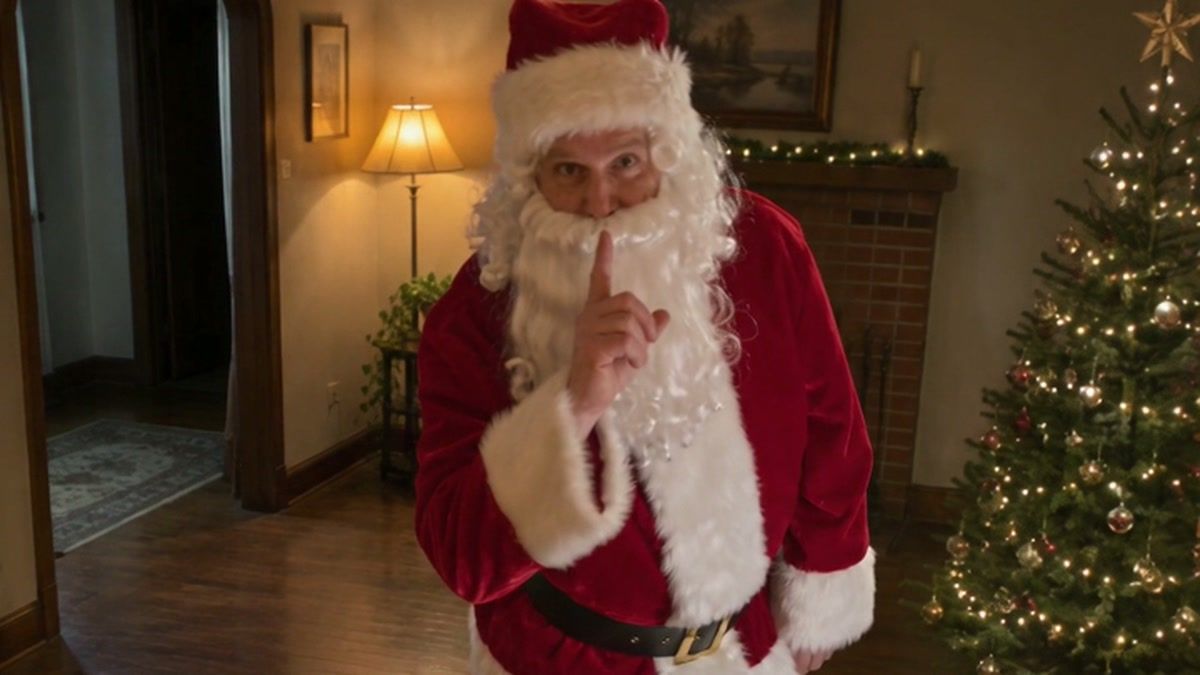
APIXO AIなら、縦長のリビング画像1枚からサンタの防犯カメラ風動画を作れます。Seedance 2.5で画像を開始フレームに指定し、終了フレームは空欄にします。Auto、10秒、720pを選び、固定カメラとプレゼントを置く動作を一つのプロンプトに書きます。下の作例はこの設定で生成しました。
防犯カメラらしい角度から部屋を撮る
部屋の高い隅から少し下向きに構え、入口、ツリー、その間の床を画面に入れます。縦動画なら元画像も縦にします。手と箱が見える明るさを残し、ソファが床を隠す場合は一歩引いて撮り直しましょう。
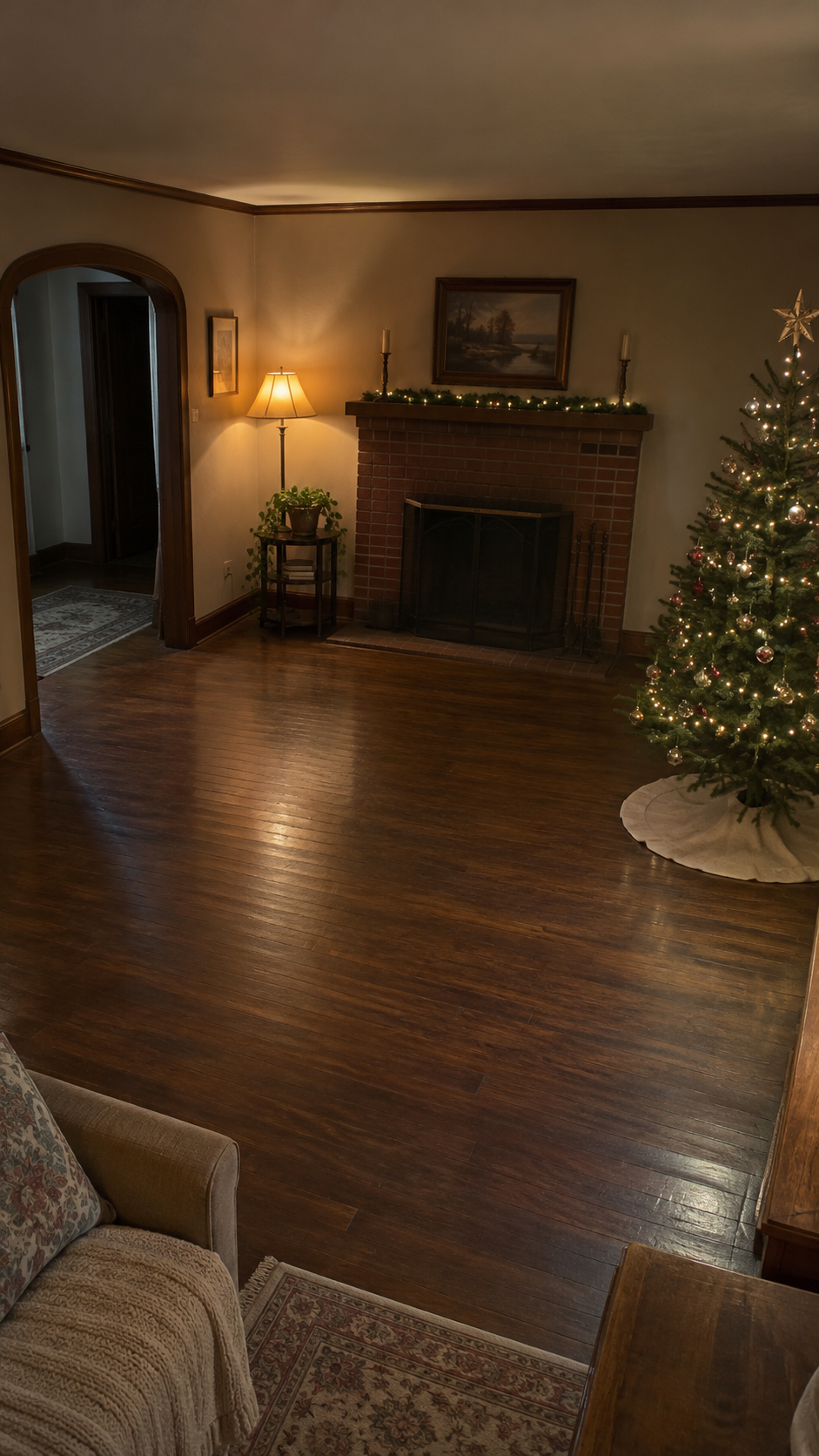
プロンプト1本で防犯カメラ風の動画を作る
- APIXO AIの動画生成ツールでSeedance 2.5を開き、First & Last Framesを選びます。
- 部屋の画像を Start にアップロードし、終了フレームは空欄にします。
- アスペクト比は Auto、長さは 10秒、解像度は 720p。声や足音が必要なら Generate Sound をオンにします。縦長の作例は 720 × 1280 でした。
- 下のプロンプトを場面に合わせて編集し、Create を押します。
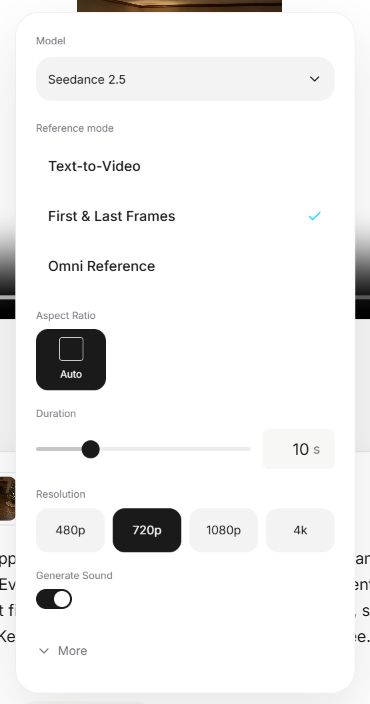
下は実際に使った英語プロンプトです。入口やツリーの位置を写真に合わせ、動作、セリフ、色やノイズを好みに応じて変えてください。カメラは固定のままにします。
Use the supplied empty living room as the exact starting frame. A 10-second recording from an old indoor home security camera on Christmas Eve. One locked high-corner wide view for the entire clip. Keep the doorway on the left, the brick fireplace, furniture and tree on the right fixed. Muted color, slightly soft low-light detail, subtle digital grain and compression, ordinary flat consumer surveillance exposure. Keep enough light to see the floor beside the tree.

Start on the empty room. One Santa in a red coat and white beard enters through the open left doorway holding one small wrapped gift, walks to the tree, crouches and sets it down on the visible floor. He lets go and the gift stays there. He stands, takes one step toward the camera, looks up into the lens, gestures shh and whispers once, “Shh. Merry Christmas.” Hold the shot briefly at the end. Quiet room tone, soft footsteps, slight paper rustle. No music.

Two small plain white fixed on-screen labels, with a narrow safe margin: CAM 01 in the top left and 12/24 11:58 PM in the bottom right. Keep both labels steady and leave the clock static. No moving camera, zoom, cuts, other people, extra gifts, subtitles, branding, or other text.
プレゼントの位置とカメラ表示を確認する
日時が崩れたら、プロンプトから日付を削り、CAM 01だけ残します。固定カメラと軽い圧縮ノイズで防犯カメラらしさを保てます。
最初と最後で入口の位置がずれていないか、手を離した直後に箱が床にあるかを確認します。作例では CAM 01 が日時より先に表示され、ランプと床は指定より暖色寄りでした。
- 箱を置く前に終わる — 歩く距離を短くするか、置いた位置で止まらせます。
- 背景が動く — 固定カメラの指定を残し、動作を一つに絞ります。
- 日時が崩れる — 日時を省き、CAM 01だけ残します。
- 床が暗すぎる — 少し明るい元画像で試します。
白黒暗視や古い監視映像の質感に変える
部屋、カメラ位置、動きをそろえ、画質の記述だけ差し替えると違いを比較できます。
- 淡いカラー — 低彩度、柔らかい輪郭、軽い圧縮ノイズ。赤い服とツリーの光は判別できる程度にします。
- 白黒赤外線 — 明るいグレーのハイライトと細かな粒子。手と箱が背景に溶け込まないようにします。
- 古いDVR — 暗部のブロックノイズ、弱いコントラスト、少しぎこちない動き。必要なフレームレートは書き出し後に確認します。
- アナログ再生 — かすかな横線と短いトラッキングの乱れ。箱を置く瞬間が隠れない程度にします。
全編を白黒にするには、開始フレームをグレースケールにし、ランプのそばを通る場面も含めて白黒の赤外線暗視を維持するよう指定します。
添付画像を部屋の配置の参考にし、カメラを固定する。白黒の赤外線暗視映像にして、細かな粒子、淡いハイライト、見分けやすい中間のグレーを加える。ツリーの根元と箱が見えるようにし、サンタがランプの前を通っても白黒を保つ。
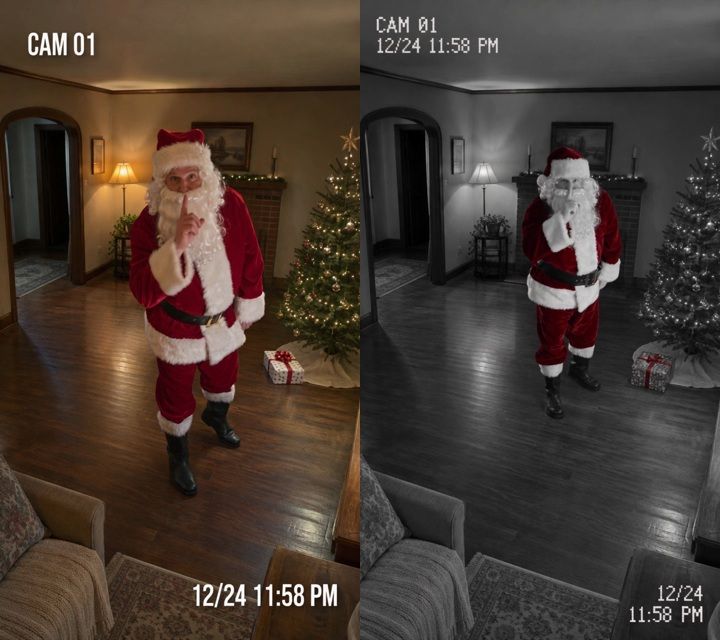
白黒の暗視映像用プロンプト全文
部屋の写真をグレースケールに変換して開始フレームにアップロードし、終了フレームは空欄のままにします。Seedance 2.5でFirst & Last Frames、Auto、10秒、720pを選びます。足音やささやきが必要なら音声生成をオンにします。以下の検証済みプロンプトの部屋の描写を、手元の写真に合わせて調整してください。
Use the uploaded grayscale living-room image as the exact first frame. Create a 10-second indoor CCTV recording on Christmas Eve. Keep one fixed high-corner wide shot, with the doorway on the left, the fireplace and furniture unchanged, and the tree on the right. Render the entire shot in black-and-white infrared night vision, with soft grain, pale highlights, clear gray midtones and light digital compression. Keep the floor by the tree visible, even as Santa passes the lamp.

Start with the empty room. One Santa in a classic coat and white beard enters through the doorway carrying one small wrapped gift. He walks to the tree, crouches, sets the gift on the visible floor and lets go. The gift stays there. Santa stands, steps toward the camera, looks up, holds a finger to his lips and whispers once, “Shh. Merry Christmas.” Hold the fixed shot briefly. Quiet room tone, footsteps and soft paper rustle.

Keep all corners clear for overlays added in editing. No text, timestamp, camera labels, subtitles, graphics, music, extra people, extra gifts, camera movement, zoom or cuts.
色が残っていたら、動画編集ソフトで彩度を0にします。CAM 01と固定のタイムスタンプ(12/24 11:58 PM)を1つだけ重ねます。書き出す前に、文字が読みやすく、プレゼントが見えているか確認してください。
固定カメラで試せる5つの別のストーリー
次は未生成のアイデアです。動きが起きる場所が見える画像を選び、元のプロンプトの動作部分を差し替えます。
- 窓の外のサンタ — 雪のポーチが見える窓を白黒暗視で。帽子と袋が見える位置で影が一度止まり、通り過ぎます。室内は無人のまま。
- 玄関に置かれた贈り物 — ドアベルの高さから階段とマットを淡いカラーで。サンタが小包を置き、小さく手を振ります。
- 棚を歩く小人の人形 — 廊下の高い隅から棚全体を古いDVR風に。人形が二歩進み、照明がつくと止まります。
- 箱を調べる猫 — ツリーの下の箱を白黒暗視で。猫がリボンを前足で触り、リボンが動くと後ずさりします。
- 閉店後の雪だるま — 店の隅からショーウィンドウをアナログ風に。照明がちらつくと飾りの雪だるまが片腕を上げます。
クリスマス以外なら、玄関先のアライグマや、消灯後に動くおもちゃにも応用できます。場所と動作は一つずつに絞り、変化が伝わる短い間を残しましょう。共有できる画像を使い、公開時はAIで再現した映像と明記してください。
APIXOで開発
画像、動画、音声の各モデルを1つの場所で探索。